

Tutorial Series
Ongoing (Q4 '24): 5-part Generative AI Series
Create RAG systems and AI agents with Sectors Financial API, LangChain and state-of-the-art LLM models -- capable of producing fact-based financial analysis and financial-specific reasoning. Continually updated to keep up with the latest major versions of the tools and libraries used in the series.
Create RAG systems and AI agents with Sectors Financial API, LangChain and state-of-the-art LLM models -- capable of producing fact-based financial analysis and financial-specific reasoning. Continually updated to keep up with the latest major versions of the tools and libraries used in the series.
Generative AI Series: Table of Contents
Table of Content
Table of Content
1
Generative AI for Finance
An overview of designing Generative AI systems for the finance industry and the motivation for retrieval-augmented generation (RAG) systems.
2
Tool-Use Retrieval Augmented Generation (RAG)
Practical guide to building RAG systems leveraging on information retrieval tools (known as "tool-use" or "function-calling" in LLM)
3
Multi-Agent Workflows
Building robust financial research systems with specialized agents using sequential chains and judge-critic patterns for improved reliability.
4
Structured Output from AIs
From using Generative AI to extract from unstructured data or perform actions like database queries, API calls, JSON parsing and more, we need schema and structure in the AI's output.
Tool-use ReAct Agents w/ Streaming
Updated for LangChain v0.3.2, we explore streaming, LCEL expressions and ReAct agents following the most up-to-date practices for creating conversational AI agents.
6
Conversational Memory AI Agents
Updated for LangChain v0.2.3, we dive into Creating AI Agents with Conversational Memory
This article is part 5 of the Generative AI for Finance series, and is written using LangChain 0.3.0 (released on 14th September 2024).For best results, it is recommended to consume the series in order, starting from chapter 1.For continuity purposes, I will point out the key differences between the current version (featuring ReAct-style agent) and the older implementations featuring
AgentExecutor (in chapter 1 and chapter 2).Tool Use LangGraph Agents
Part 5 of this series will feel familiar to readers who have gone through the materials in chapter 2, with the addition of theLangGraph library and
a prebuilt ReAct agent that comes with LangGraph.
To make use of the LangGraph library, you will need to install it:
- Setting up our secrets and retriever utility
- Creating our tools with the
@tooldecorator - Use
create_react_agentto create our agent equipped with tools we created from (2) - Using the LCEL syntax to set up our runnables
- Invoke the runnables
Setting up a retriever utility
The following code should feel familiar to you if you have gone through chapter 2: tool use LLMs.Creating information retrieval tools
@tool decorator, we turn our functions into LangChain’s structured tools, of the type <class 'langchain_core.tools.structured.StructuredTool'>, and
these tools can be used, either directly or indirectly by our agent.
Just to see how the tools work, let us invoke them directly:
ReAct agent yet. In fact, we don’t even have a Language Model (neither Llama3.1 nor GPT-4) to work with.
Here is the result of the above code:
Bringing in our LLM
Now that we have our tools in place, let us also create aprompt object and bind our tools to a LLM model of our choice.
Instead of invoking each tool directly like we did earlier, we will create a runnable that chains the prompt with the tool-use LLM model.
Our expectation is to be able to prompt the runnable with something like “overview of BBRI” and have the agent invoke the correct tool — in this case, get_company_overview — along with
the correct parameters for us.
Note
The modelllama3-groq-70b-8192-tool-use-preview is no longer available. Therefore, this guide changed the model into openai/gpt-oss-120b. For other available choices, visit GROQ Models (Updated: 2026-03-02)
.tool_calls.
At this point, you might be tempted to chain the output of tool_calls to further runnables, thus actually calling the API for information retrieval
and then using structuring the output into the desired format. However, LangChain provides some utility functions to make this process easier. Recall from
chapter 2 we have the AgentExecutor class that helps us orchestrate the tools and the LLM model:
ReAct agent instead, as it is
also now the recommended way to create agents in LangChain. The AgentExecutor class is still available,
but its official documentation now recommends the use of ReAct agents instead.
LangGraph pre-built ReAct agent
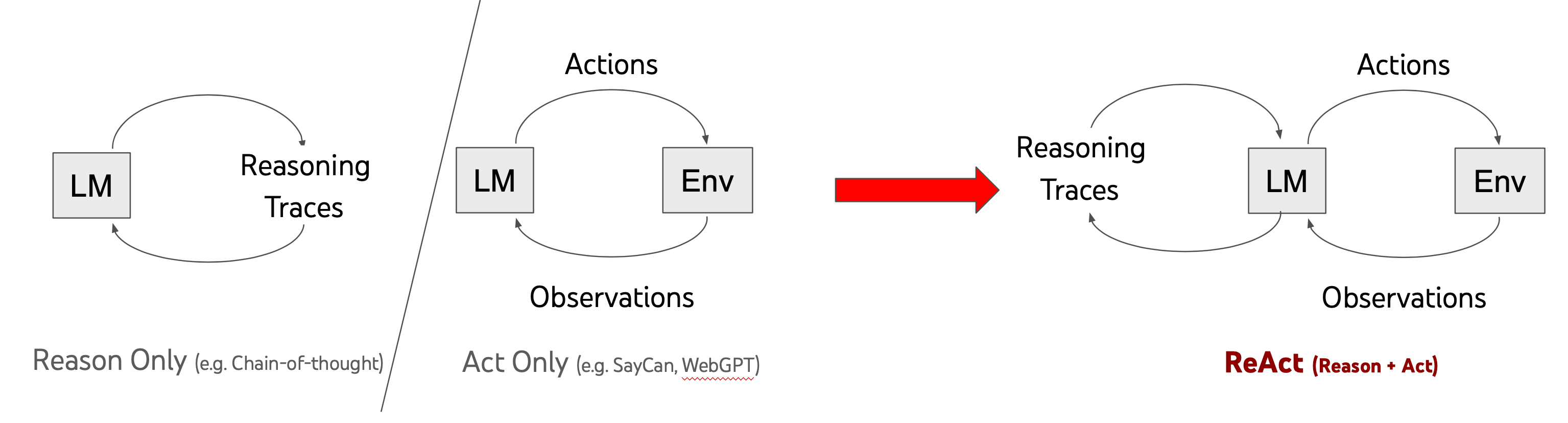
We explore the use of LLMs to generate both reasoning traces and task-specific actions in an interleaved manner, allowing for greater synergy between the two: reasoning traces help the model induce, track, and update action plans as well as handle exceptions, while actions allow it to interface with external sources, such as knowledge bases or environments, to gather additional information. ReAct outperforms imitation and reinforcement learning methods by an absolute success rate of 34% and 10% respectively, while being prompted with only one or two in-context examples.
Introduction to pre-built ReAct agents
We’ll start off by importing thecreate_react_agent function from langgraph.prebuilt. This function requires two arguments:
model: The LLM model to usetools: A list of tools to bind to the agent, essentially replacing thellm.bind_tools(tools)set-up we did earlier- (optional)
state_modifier: A function that modifies the state of the agent. This is useful for adding system messages or other state changes to the agent.
create_react_agent is of type <class 'langgraph.graph.state.CompiledStateGraph'> which conveniently also implements the
invoke method. The most basic usage of the agent is as follows:
.invoke() method takes a dictionary with a key messages and a value that is a string. The output is a dictionary that would contain, among other things,
a messages key with a list of HumanMessage and AIMessage objects.
A Financial Data Agent with ReAct
With the newly equipped knowledge, we can now create a financial data agent that can retrieve companies ranked by a certain metric, as well as providing overviews of companies based on their stock symbols. Our code is slightly modified from the one in the previous section, with the addition of astate_modifier and another utility function
to simplify the invocation of the agent.
get_company_overview tool. Even then, the response
would be in the original format returned by the API, i.e. a JSON object — making it less readable for the end-user.
With the ReAct agent, we’re now querying in natural language, and getting a far more human-friendly response, generated
by the agent.
We can also query the agent for the top 5 companies ranked by a certain metric:
state_modifier were also
being followed as the agent responded with a markdown-formatted answer (ordered lists, along with bolded text syntax).
Streaming the agent’s response
The last section of this chapter will demonstrate the idea of streaming. Streaming is a concept where we want to make our AI feels a bit more human-like and responsive, by having it to stream its response in chunks, with our program yielding each chunk as soon as they are available. This is especially true when the agent can take a long time to process the query, or when the underlying large language models are slow to respond. For the purpose of this demonstration, we will be using the same query as the one above. Notice that we areprinting the
the response as they come in, rather than waiting for the entire response to be generated before displaying it.
Streaming JSON and Structured Output
Streaming sounds like a really great idea, but also one that would fail if the output is JSON (or any structured syntax, like xml). If we were to stream a JSON object, and usejson.loads (or json.dumps) on the partial JSON, the parsing would fail due to
the incomplete syntax.
The solution is to apply the parser on the input stream so that it could attempt to auto-complete the partial json into
a valid and complete JSON object.
Here is a simple example of one such implementation:
Challenge
Earn a Certificate
There is an associated challenge with this chapter. Successful completion of this challenge will earn you a certificate
of completion and possibly extra rewards if you’re among the top performers.
- True to the spirit of value investing, find the top 7 companies based on their P/E values (lower is better).
- Issue a second query to get an overview of the fourth company in the list.
Learn: What is P/E value and how is it used?
If you are unfamiliar with the concept of P/E values and value-investing in general, I have an article that explains the concept in more detail. Giving it
a read will help you understand the context of the challenge better.