
Linux

Linux was created by Linus Torvalds in 1991 as an alternative to proprietary Unix systems. It has since grown into a powerful, secure, and highly customizable operating system that powers everything from personal computers to servers, smartphones (Android), and supercomputers. The Linux ecosystem is supported by a vast community of developers and users who contribute to its continuous development and improvement.


Working
Linux operates on a kernel-based architecture, where the kernel manages hardware resources and provides essential services to higher-level software. It supports a multi-user, multi-tasking environment, allowing processes to run concurrently while securely sharing system resources among users. The system follows a hierarchical file structure, starting from the root directory (/), where all devices and resources are represented as files.
Architecture of Linux
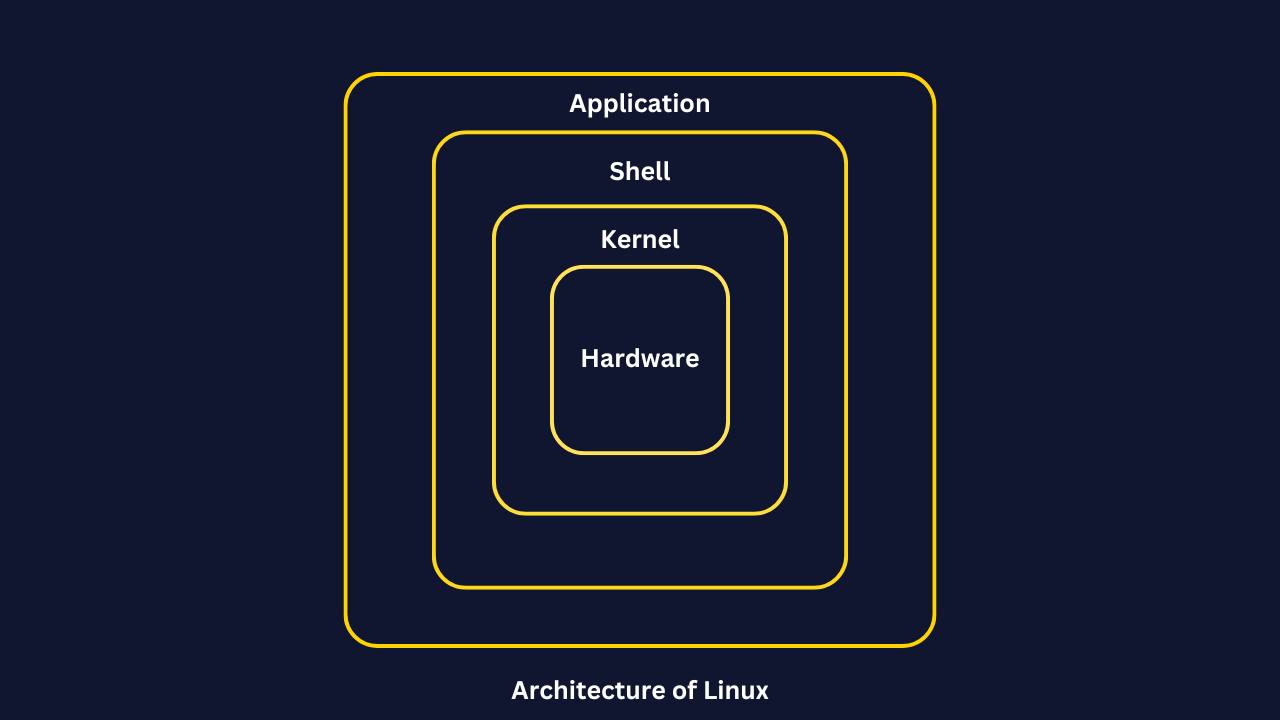
Hardware Layer (Core)
- Contains physical components like CPU, memory, and storage devices
- Forms the base layer, interfacing directly with hardware
Kernel Layer
- Core of the Linux operating system
- Manages hardware resources, memory, and processes
- Provides essential services and hardware abstraction
- Handles system calls and device drivers
Shell Layer
- A command-line interpreter that bridges the user and kernel
- Processes user commands and scripts
- Examples include Bash, Zsh, and Fish
Application Layer (Outermost)
- Includes user applications, GUI interfaces, and system utilities
- Supports third-party applications and system tools
This layered architecture follows a hierarchical structure where each layer communicates with adjacent layers, with the kernel serving as the critical intermediary between hardware and software components. Each outer layer depends on the services provided by the inner layers, creating a robust and modular system design.
Linux Commands
| Command | Description | Example Usage |
|---|---|---|
ls |
List files and directories | ls -l |
cd |
Changes the current directory | cd /home/user |
pwd |
Displays the current directory path | pwd |
mkdir |
Creates a new directory | mkdir new_folder |
rm |
Deletes files or directories | rm file.txt |
rmdir |
Removes empty directories | rmdir empty_folder |
cp |
Copies files or directories | cp source.txt destination/ |
mv |
Moves or rename files and directories | mv old.txt new.txt |
cat |
Displays file contents | cat file.txt |
nano |
Edits a file using the nano editor | nano file.txt |
vim |
Edits a file using the Vim editor | vim file.txt |
touch |
Creates an empty file | touch newfile.txt |
chmod |
Modifies file permissions | chmod 755 script.sh |
chown |
Changes file ownership | chown user:group file.txt |
find |
Searches for files in a directory | find /home -name "*.txt" |
grep |
Searches for a pattern inside files | grep "error" logfile.log |
ps |
Displays running processes | ps aux |
kill |
Terminates a process by its ID | kill 1234 |
top |
Shows system resource usage in real time | top |
df |
Shows disk space usage | df -h |
du |
Shows directory size | du -sh folder/ |
tar |
Archives multiple files | tar -cvf archive.tar files/ |
unzip |
Extracts files from a ZIP archive | unzip archive.zip |
wget |
Downloads a file from the internet | wget https://example.com |
curl |
Fetches data from a URL | curl -O https://example.com |
echo |
Prints text to the terminal | echo "Hello, World!" |
whoami |
Displays the current logged-in user | whoami |
uptime |
Shows system uptime | uptime |
history |
Displays command history | history |
clear |
Clears the terminal screen | clear |
All contributors
- Anonymous contributor
Learn General on Codecademy
- Start your programming journey with an introduction to the world of code and basic concepts.
- Includes 5 Courses
- With Certificate
- Beginner Friendly.4 hours
- Looking for an introduction to the theory behind programming? Master Python while learning data structures, algorithms, and more!
- Includes 6 Courses
- With Professional Certification
- Beginner Friendly.75 hours