

DigitalOcean Harness Runtime
Run AI coding agents in isolated DigitalOcean sandboxes with session lifecycle, permissions, and a YAML environment spec.
Last verified 23 Nov 2026
Managed Agents, available in public preview for all users, bring together hardware-isolated microVM sandboxes and governed tool access so you can scale agentic work in the cloud without building and maintaining any underlying infrastructure. Execute code from an existing application, run complete agents with durable sessions, or connect agents to the tools they need to act. Managed Agents includes two services that you can use independently or together, with each scaling to meet your specific needs:
DigitalOcean Harness Runtime: DigitalOcean Harness Runtime provides managed, hardware-isolated microVM sandboxes with built-in tools such as Chromium to run agents and execute arbitrary code. Rich lifecycle APIs preserve conversational history and working state across sessions, letting you pause, resume, and fork work to control costs and adapt to the nonlinear nature of agentic workflows. Scale complete agents such as Claude Code or use sandboxes independently for code execution, all through the same service.
Both scenarios use the same service and lifecycle controls, so you can scale code execution and complete agents without maintaining separate infrastructure for each. See What You Can Build with Managed Agents for example use cases.
Action Gateway: Action Gateway gives agents access to 36,000+ tools through a single managed MCP endpoint. The catalog includes DigitalOcean-maintained tools for web search, web fetch, browser automation, and DigitalOcean infrastructure management, alongside connectors for platforms such as GitHub, HubSpot, Stripe, and Snowflake. Teams can also extend the catalog with their own MCP servers and internal tools.
Together, these services provide a managed foundation for running agents, preserving their work, and governing their access to tools. You can focus on making agents more useful while DigitalOcean manages the execution, persistence, and tool infrastructure underneath.
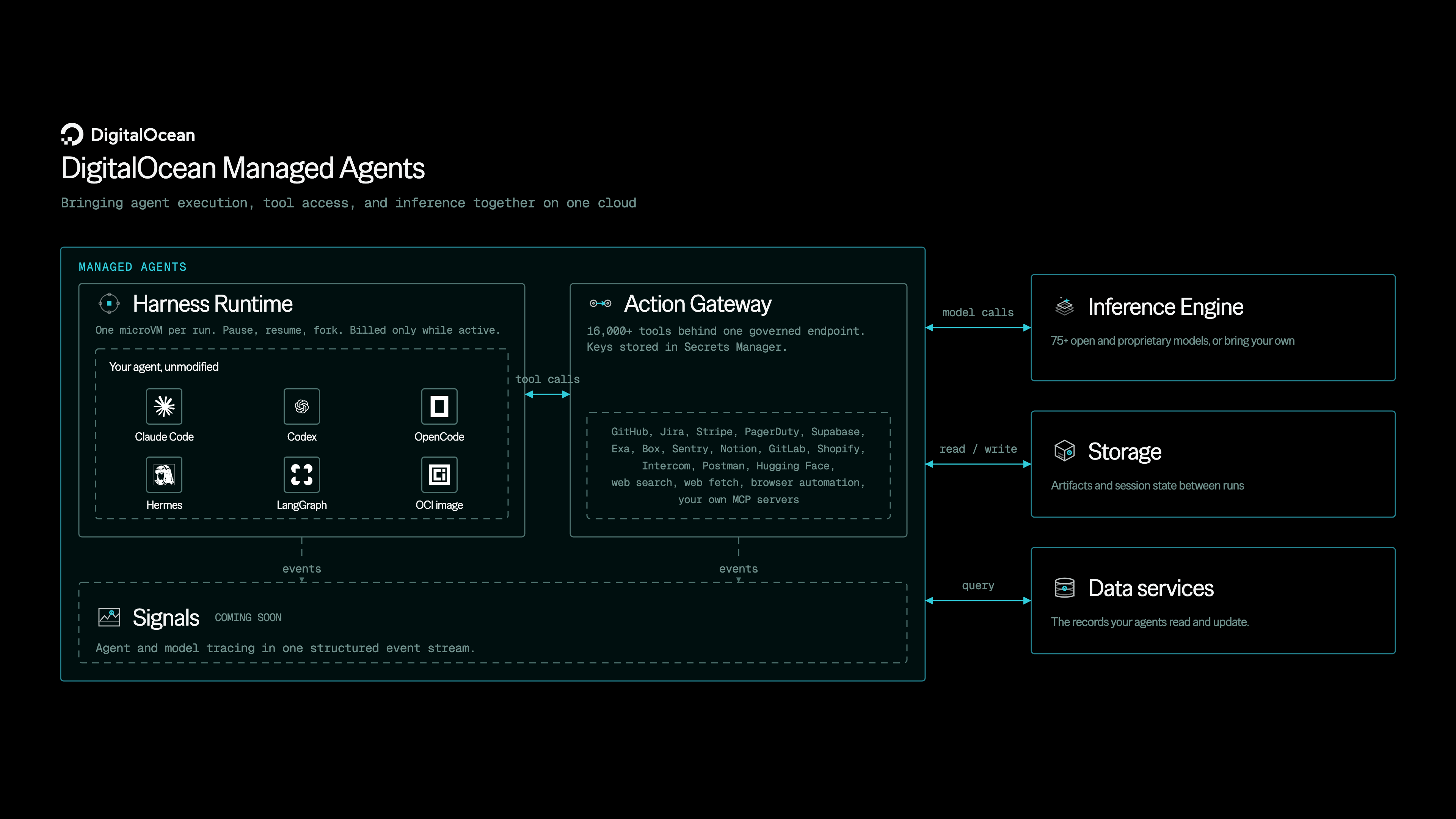
For a walk-through of each component and the DigitalOcean services around them, see Managed Agents Architecture.
Run AI coding agents in isolated DigitalOcean sandboxes with session lifecycle, permissions, and a YAML environment spec.
Give agents access to tools, APIs, and connectors through a managed MCP endpoint or SDK without putting credentials in the model context.
Action Gateway now provides access to more than 36,000 tools. Use the Tool Reference to search for a tool.
Each time you add funds to your Inference and Agents balance, including through auto-reload, you now get a separate invoice. The invoice is already paid, with tax charged at the time of payment, and appears in your billing history as soon as the charge goes through. Your monthly invoice no longer includes a line item for these payments. Funds added before 18 November 2026 stay on the monthly invoice.
Interactive stdin for DigitalOcean Harness Runtime sandbox commands is enabled per team. Start a command with keep_stdin_open on an event stream, then write base64 chunks to /v2/harness-runtime/sessions/{session_id}/sandbox/exec/{exec_id}/stdin while stdout and stderr continue to stream. Use this to drive a REPL, answer a prompt, or feed a long-running process. For more information, see How to Send Interactive Stdin to a Sandbox Command.
Action Gateway now lets you pin a tool to a released version and keep calling it after newer versions are released. List a tool’s versions with a changelog that marks breaking changes, and see the latest version in _meta.latest_version when a call uses an older one. For more information, see Tool Versions.
You can change the tools, env, and secrets of an existing DigitalOcean Harness Runtime session without creating a new session. For sessions that use DigitalOcean Serverless Inference, you can also change the model by setting HARNESS_INFERENCE_MODEL in env. The session keeps its conversation history and workspace files, and the update applies to that session only. Updating session settings is in public preview and is enabled per team. For more information, see How to Update the Settings of a Session.
For more information, see the full release notes.
Try using different keywords or simplifying your search terms.