
Extension Details

- Java
- by ParkCedar Pty Ltd
- 55 Recent Installs | 424 Total Installs
- Complete Java development support with Eclipse JDT.LS, tree-sitter syntax highlighting, intelligent code completion, navigation, refactoring, and real-time diagnostics.
- Repository
- Bug Reports
-
 Read & Write Files
-
 Launch Subprocesses
-
 Send Network Requests
-
This extension is allowed to:
Readme
Java for Nova
Java language support for Nova, powered by Eclipse JDT.LS.
You get completion, diagnostics, navigation and refactoring — the things you'd
expect from a Java IDE — without leaving Nova.
Works with Maven, Gradle and plain Eclipse projects.
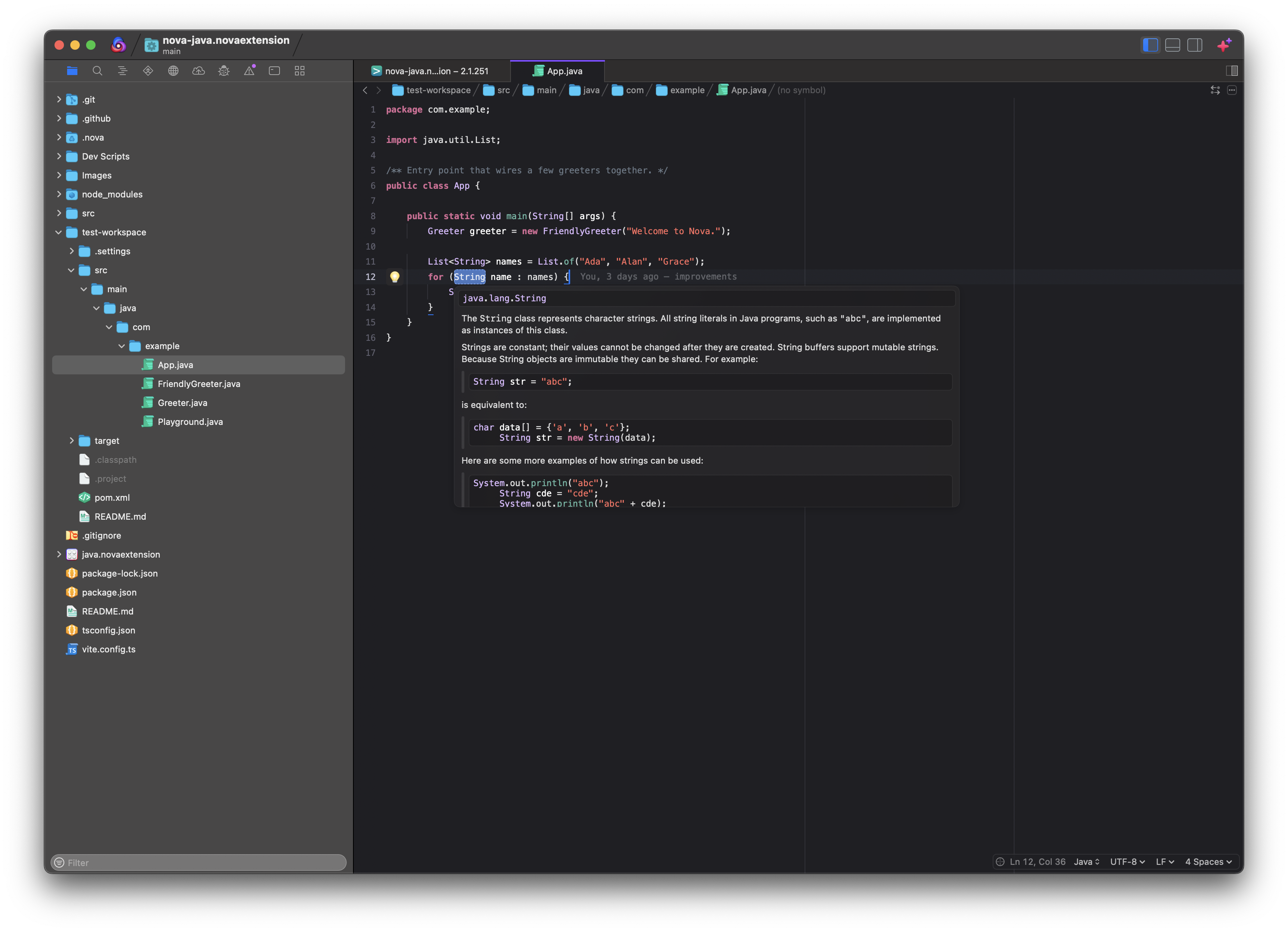
What you get
Writing code
- Completion, hover documentation and signature help
- Real-time errors and warnings as you type
- Quick fixes and refactorings at the cursor (⌥⏎) — add an import, implement
an interface, create a missing field
- Optional inline parameter-name hints
Moving around
- Jump to Definition, Type Definition and Implementation
- Find References
- Find Symbol across the whole project
- Jumping into a library or JDK class opens its decompiled source
Tidying up
- Format File (⌥⇧F) or just the selection
- Organize Imports
- Rename Symbol across every file that uses it
- Both formatting and organize-imports can run automatically on save
Reading code
- Fast tree-sitter syntax highlighting
- Code folding for classes, methods, blocks and comments
The Java sidebar
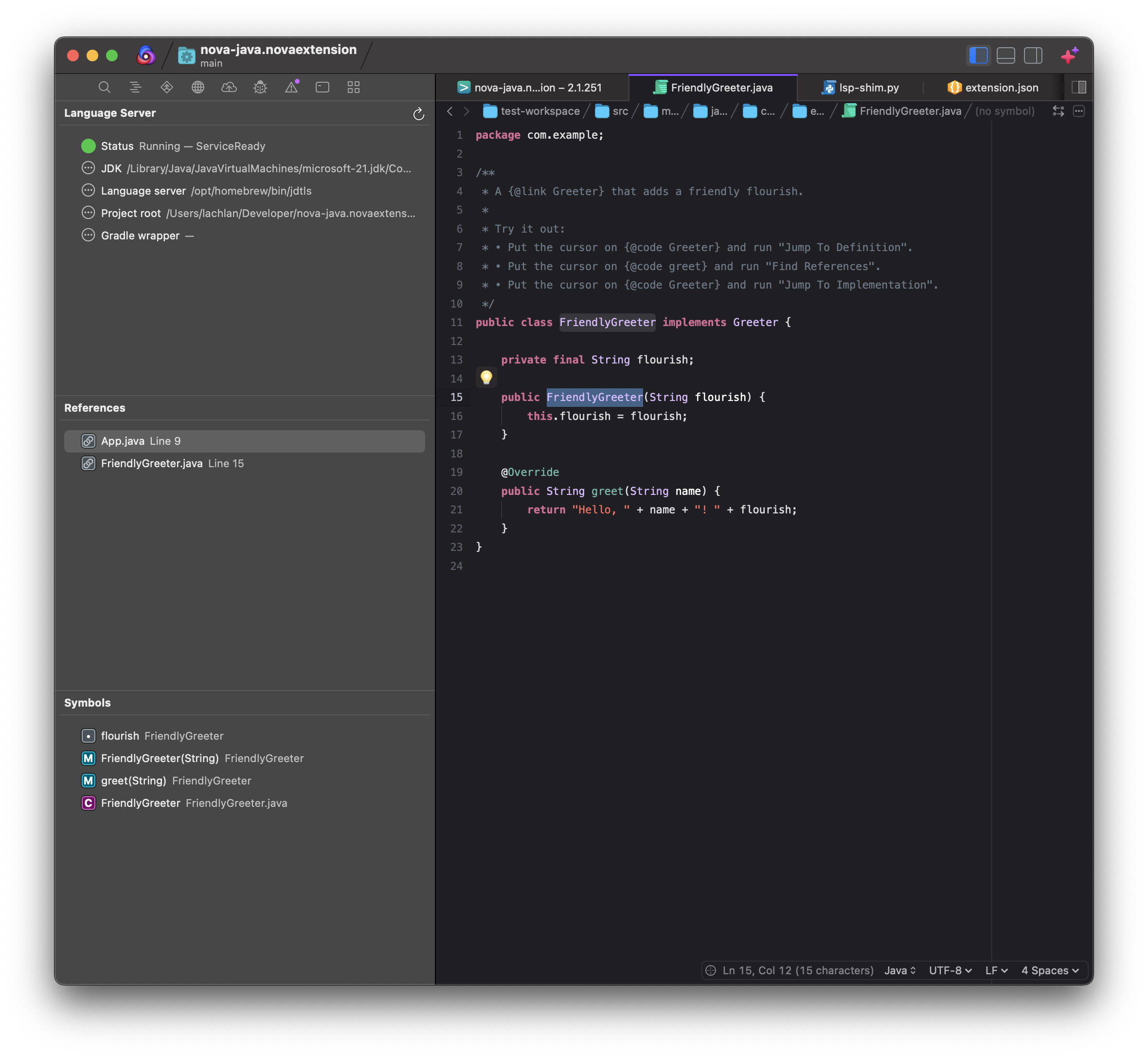
Three sections, all in one place:
Language Server — is it running, and what is it running with? The status dot
turns green once the server has finished importing your project (which can take
a minute on a big one), and the rows below show the JDK, server and project root
it actually resolved. When something isn't working, this is the first place to
look. The refresh button restarts the server.
References — results from Find References. Click a row to jump to it.
Symbols — the structure of the file you're editing: classes, methods and
fields, nested the way they are in the code. It follows whichever file is in
front of you and updates as you type.
Before you start
You need two things installed.
A JDK, version 21 or newer. The extension finds it automatically from
JAVA_HOME, jenv, or the standard macOS locations.
java -version          # check what you have
brew install openjdk@21
The Eclipse JDT language server.
brew install jdtls
If either one lives somewhere unusual, point at it in the extension preferences.
Getting started
- Install the extension from Nova's Extension Library.
- Open a Java project. The extension starts on its own when you open a
.java
file. - Watch the Language Server section in the Java sidebar. It says
Starting… with a progress percentage while JDT.LS imports the project, then
Running. Completion and navigation work from that point on.
The first import on a large project takes a while. Later ones are much faster.
Commands
In the Editor menu whenever a Java file is open:
| Command | Shortcut |
|---|---|
| Jump To Definition | |
| Jump To Type Definition | |
| Jump To Implementation | |
| Find References | |
| Find Symbol | |
| Code Actions… | ⌥⏎ |
| Rename Symbol | |
| Format File | ⌥⇧F |
| Format Selection | |
| Organize Imports |
Restart Language Server is in the Extensions menu, and on the sidebar's
Language Server header.
Settings
Global settings live in Extensions → Extension Library → Java → Preferences.
Per-project settings live in Project → Project Settings → Java, and override
the global ones.
Language server — which server to use, a custom server path, and the JDK
home. Leave these blank unless auto-detection picks the wrong thing.
Project — the project root (point JDT.LS at one module instead of a whole
monorepo) and where gradlew lives. Per-project settings also cover extra
source paths, the output directory and referenced JARs.
Formatting — format on save, organize imports on save, which formatter, and
which style.
Linting — turn diagnostics off if you'd rather not see them.
Formatting
Two options, set by Formatter in preferences.
Language Server (Eclipse JDT) is the default and needs no project setup.
Pick a style: Google Java Style, AOSP, Eclipse's own default, or Custom — which
takes an Eclipse formatter XML file, either a local path or a URL.
Gradle Spotless runs ./gradlew spotlessApply instead, so your project's
own Spotless config decides the formatting. Use this if your team already
standardises on Spotless — it's also how to get Palantir Java Format, which the
Eclipse formatter can't do.
plugins {
    id 'com.diffplug.spotless' version '6.x.x'
}

spotless {
    java {
        palantirJavaFormat()
    }
}
Spotless rewrites files on disk and Nova reloads them. On a machine with no
network, turn on Run Spotless offline — otherwise Gradle spends minutes
trying to reach the plugin portal and formatting appears to hang.
When something's wrong
Check the Language Server section first. It tells you what the extension
resolved and what state the server is in:
- Failed with no JDK — install a JDK 21+, or set Java JDK Home.
- Failed with no server —
brew install jdtls, or set a custom server path. - Stuck on Starting… — JDT.LS is still importing. Large projects take a while.
- Nothing works, but the status says Running — open the Extension Console
(Extensions → Show Extension Console). Turning on Log language server
traffic in preferences records the full conversation with the server.
If the server gets wedged, Restart Language Server gives it a clean start.
Building from source
Written in TypeScript, bundled with Vite.
npm install       # dev dependencies
npm run build     # bundle src/ → Scripts/main.dist.js
npm run watch     # rebuild on change
npm run typecheck # type-check only
npm test          # run the test suite
Scripts/main.dist.js is generated and not committed, so run npm run build
before installing or submitting.
Acknowledgements
Originally forked from, and still heavily inspired by, the
nova-gobee extension.
Bugs and feature requests: github.com/lachierussell/nova-java/issues
Release Notes
v 1.1.4
- Fixed hover, completion, go-to-definition, signature help, document
highlight and code actions never firing. Nova advertises
dynamicRegistration: true for those features, so JDT.LS left them out of
its initialize response and announced them later with
client/registerCapability; Nova acknowledges those registrations but does
not act on them, so it never sent the requests. The server is now launched
behind a small stdio shim that clears those flags, which makes JDT.LS
declare its capabilities statically. References, formatting and rename were
unaffected all along because JDT.LS always declared those statically
- The shim also terminates the language server when Nova closes the pipe, so
a dead client can no longer strand a JVM holding the workspace lock
- Orphaned language server processes are now killed before a new one starts.
client.stop() only asks the server to shut down over LSP, which a wedged or
mid-import JDT.LS ignores; the JVM then outlived its client, kept the Eclipse
workspace lock, and every later restart came up unable to take it. Only a
process matching both the JDT.LS marker and this project's exact data
directory is signalled, so no other project's server is ever touched
- Fixed the language server being launched with a -configuration directory
that conflicts with the one the jdtls launcher sets for itself. The server
connected but could not answer requests, so hover, completion and
go-to-definition did nothing
- Fixed JDKs being ranked lexically, which picked Java 8 over Java 21 and
handed the server a JDK it refuses to run on
- The sidebar now reports real readiness. JDT.LS accepts a connection long
before it can answer, so it shows the server's own import progress and
commands say "still starting" instead of returning nothing
- Language server errors (a failed project import, for example) are now written
to the Extension Console instead of being discarded
- A restart now waits for the previous JVM to release its workspace lock, and
lifecycle changes are serialised so two launches cannot interleave
- Settings changes that don't affect how the server is launched are pushed to
the running server instead of forcing a full project re-import, and a single
edit no longer triggers two restarts
- "Formatting style" now actually reaches the server; it previously had no
effect at all. Likewise "Source Paths", "Output Path" and
"Referenced Libraries"
- Fixed Rename Symbol dropping most of a rename when the server split one
file's edits across several entries
- "Jump To Definition" now opens decompiled sources for types inside JARs
(the JDK's own classes and dependencies) instead of doing nothing
- Added "Log language server traffic" to record the LSP conversation in the
Extension Console
- Added "Run Spotless offline" so a networkless Gradle fails instead of stalling
v 1.1.2
- Fixed format on save corrupting files by scattering spaces through the text
(#1). Edit positions are now resolved against a single snapshot of the
document, edits that overlap or fall outside it are rejected instead of
applied, and formatting results are discarded if the document changed while
the server was responding
- Format on save now waits for the organize-imports change to reach the server
before requesting formatting
- Added a unit test suite (npm test)
- Fixed restarts failing with "already running" after the language server
exited: each launch now uses a fresh client identifier and the previous
client is always stopped
- The server is restarted automatically with a backoff when it exits
unexpectedly, and pauses with a notification after repeated crashes
- Fixed projects with the same folder name sharing one JDT.LS data directory
- Added "Project Root" so the language server can be scoped to a subfolder
- Added "Gradle Wrapper Path" so Spotless can use a gradlew at the
repository root while the server runs in a subfolder
- The Language Server sidebar now shows the project root and Gradle wrapper
v 1.1.0
- Rewrote the extension in TypeScript, bundled with Vite (TypeScript 7)
- Fixed Jump to Definition / Type Definition / Implementation, which previously
did not navigate; now reveals the target (with a picker for multiple results)
- Added "Code Actions…" (⌥⏎) for quick fixes and refactorings
- Added "Format Selection" and "Organize imports on save"
- Added optional inlay parameter-name hints
- Added a "Language Server" sidebar showing status and the resolved JDK
- Replaced modal error dialogs with transient notifications
- Rewrote LSP ⇄ Nova position conversions (correct and much faster)
- Debounced server restarts when several settings change at once
v 1.0.2
- Fixed issues with LSP not always activating
- Published repository to github
- Updated readme
v 1.0
- Initial version
License
MIT License
Copyright (c) 2024 Nova Java Extension
Permission is hereby granted, free of charge, to any person obtaining a copy
of this software and associated documentation files (the "Software"), to deal
in the Software without restriction, including without limitation the rights
to use, copy, modify, merge, publish, distribute, sublicense, and/or sell
copies of the Software, and to permit persons to whom the Software is
furnished to do so, subject to the following conditions:
The above copyright notice and this permission notice shall be included in all
copies or substantial portions of the Software.
THE SOFTWARE IS PROVIDED "AS IS", WITHOUT WARRANTY OF ANY KIND, EXPRESS OR
IMPLIED, INCLUDING BUT NOT LIMITED TO THE WARRANTIES OF MERCHANTABILITY,
FITNESS FOR A PARTICULAR PURPOSE AND NONINFRINGEMENT. IN NO EVENT SHALL THE
AUTHORS OR COPYRIGHT HOLDERS BE LIABLE FOR ANY CLAIM, DAMAGES OR OTHER
LIABILITY, WHETHER IN AN ACTION OF CONTRACT, TORT OR OTHERWISE, ARISING FROM,
OUT OF OR IN CONNECTION WITH THE SOFTWARE OR THE USE OR OTHER DEALINGS IN THE
SOFTWARE.