


Planet Python
Last update: October 09, 2026 04:49 PM UTC
October 09, 2026
Python Morsels
Python 3.15's best new features
Python 3.15 includes a UTF-8 default encoding, explicit lazy imports, * unpacking in comprehensions, a new sampling profiler, sentinel, frozendict, and more!

Table of contents
A UTF-8 default encoding
The best feature might be one of the most boring ones.
As of Python 3.15, UTF-8 is the default file encoding on all operating systems, which means... Windows.
Linux and Mac already used UTF-8 as their default file encoding in Python. But on Windows, Python used a legacy code page, which depended on your system's language settings. With English language settings, it was usually CP-1252.
Say a coworker on a Mac writes a file with an accented character in it:
>>> with open("cafe.txt", mode="wt") as f:
...     f.write("café")
...
4
What happens if we read that file from Python running on a Windows machine? Using the Windows default encoding of CP-1252, this is what we'd see:
>>> open("cafe.txt", encoding="cp1252").read()
'café'
We don't get an error... but we do get garbled text.
UTF-8 stores é as two bytes, and CP-1252 happily reads those two bytes as two separate characters.
And if the file had an emoji in it, the old default encoding on Windows couldn't even write the file to begin with:
>>> with open("snake.txt", mode="wt", encoding="cp1252") as f:
...     f.write("🐍")
...
Traceback (most recent call last):
  File "<stdin>", line 2, in <module>
    f.write("🐍")
    ~~~~~~~^^^^^^
  File "/home/trey/.local/share/uv/python/cpython-3.15.0rc2-linux-x86_64-gnu/lib/python3.15/encodings/cp1252.py", line 19, in encode
    return codecs.charmap_encode(input,self.errors,encoding_table)[0]
           ~~~~~~~~~~~~~~~~~~~~~^^^^^^^^^^^^^^^^^^^^^^^^^^^^^^^^^^
UnicodeEncodeError: 'charmap' codec can't encode character '\U0001f40d' in position 0: character maps to <undefined>
In Python 3.15, the open function uses UTF-8 as its default encoding on every operating system, so a file written on one machine reads the same on every other machine.
If your code also needs to run on older versions of Python, it's still a good idea to explicitly pass encoding="utf-8" to the open function.
Sentinel objects
There's also now an official …
Read the full article: https://www.pythonmorsels.com/python315/
Rodrigo Girão Serrão
The 5 most exciting new features of Python 3.15

This article explains the 5 best new features of Python 3.15 with clear examples and explanations.
Python 3.15 has been published and it packs plenty of new features and improvements over Python 3.14. This article explores the five most exciting new features of Python 3.15:
- Lazy imports
- New built-in
frozendict - New built-in
sentinel - Unpacking inside comprehensions
- Tachyon, a new sampling profiler
You'll get the elevator pitch of each feature and you'll see a couple of examples of their usage.
By the end of this article you'll have a clear picture of some of the new cool features that Python 3.15 brings to the table and you'll be excited to try them out.
15 days of Python 3.15
To celebrate the release of Python 3.15, over the next 15 business days I'll be writing about a new 3.15 feature every day. Explained clearly and with examples so you don't have to sift through the changelog.
Subscribe to receive this free email series:
If you want, you can also check the schedule of the upcoming emails.
Lazy imports
Explicit lazy imports, introduced in PEP 810, introduce the new keyword lazy so that you can mark an import as lazy.
Lazy imports don't run the module you're importing until the imported name is needed.
This feature is very useful if you have applications that have a slow startup time because they import heavy modules. For example, you can speed up the startup time of a CLI by lazy importing the dependencies of the CLI or the startup time of a development server that doesn't need to frontload every single dependency while you're debugging.
A lazy import starts with the...
Glyph Lefkowitz
Programming Isn’t Special
Creative Work
Writers went on strike to get protections against “AI”. Thousands of artists have signed open letters in protest of “AI”. There are so many copyright lawsuits from creative industry groups against AI that there’s a whole dedicated website for it. Popular YouTubers absolutely hate it. If they’re also musicians, they REALLY hate it. Across all creative industries, there is a concerted push to reject this technology.
Yet, almost unique among creative fields, many experienced programmers remain convinced that it’s fine to use “AI” for programming. We do seem to hate it, and it’s making us all miserable, and what it’s doing to our industry, but we are using it anyway.
A lot of the justification of this resignation seems to be to be because programming is not Art. If the tool can get the job done, and the job is just functional, then why does it matter?
It does matter, though. It matters because we shouldn’t be using AI to produce Art, and programming is Art.
Art can be Mundane
Some people will say that programs cannot be art because programs are functional, rather than being expressive. Programs are mundane whereas art is transcendent.
This is based on a distorted understanding of what Art actually is.
In John Berger’s “Ways of Seeing”, he names this type of distortion “mystification”. His example of this process is both amusing and illustrative. I encourage you to read it in its entirety.
In summary, though: Berger critiques the florid prose of an art historian describing a commissioned group portrait, including phrases like “subtle modulations of the deep, glowing blacks” and “harmonious fusion”. The portrait is described as sublime, in nearly ecstatic terms.
Berger reveals that the reality of this portrait is that a poor old painter needed some work, and some officials probably thought it might be nice to have an official portrait. So they paid some money to the poor old man, and he painted it, and then they had a painting. It’s a well-executed portrait of a group of people. Beautiful, even. But it was work commissioned for a fairly mundane purpose and it suited that purpose just fine. It was not, and is not, a divine relic.
Culturally, we are prone to mystifying painting, and sculpture, and film, and music. We imbue them with “subtle modulations”. We ignore their functional aspects — we desire decoration, amusement, and distraction — and focus on their emotional impact.
Don’t get me wrong: I love me some good aesthetic philosophy. I think it’s great to really examine our reactions to artwork and to try and gain a deeper understanding of our culture and our selves through media analysis. If anything we really need to do more of it.
This does not mean that the creation of such works is mystical or that it should be venerated beyond any other sort of labor.
Not least of which other types of labor that are adjacent to, but not as culturally venerated, as fine art. We tend to mystify the work of a novelist, but to denigrate the work of a journalist. In reality, the functional prose of the journalist is no less important and deserves no less respect.
Although they might be far below the ethereal realm that novelists inhabit in our collective imagination, even journalists receive more respect and thus more mystification than lowly copywriters. Yet, there is no transcendental distinction between “novelist” and “copywriter”; the many of the skills are the same, and the distinction is merely an accident of commerce and opportunity.
In fact, many famous writers have famously inhabited both roles. This is not an accident! Working with words professionally, even (perhaps especially) mundane words, is excellent practice for working with words in a more purely artistic context, because even mundane creativity is still artistic.
Code can be Beautiful
One thousand Internet years ago, when I was in my late teens, I would describe myself as a “code poet”. I was relentlessly mocked for this as what the Youth would today call “being cringe”, and at the time was referred to as “pretentious”.
I succumbed to the peer pressure, removed it from my email signature and my bio. While I still believed strongly in the parallels, I accepted that — socially, at least — comparing code to poetry, or indeed to Art, was a silly thing to do.
However, I never abandoned the idea, in my heart.
The thing that I am most well-known for, the invention of Deferred, was specifically an aesthetic reaction to the tedium of passing callback and errback parameters to every single remote procedure call in an RPC client/server application. Those two callbacks got the job done just fine. But they were ugly, and annoying to work with.
Deferred is an intentional poem about asynchronous task execution, with a deliberate eye to the aesthetics of the problem and the experience of using it. It was influential because of its focus on aesthetics.
I do not want to overstate the beauty or profundity of this minor contribution, or indeed its durability. That a poem exists does not mean it is a great poem, merely that it is a poem.
Our aesthetic culture around programs is more like folk epic poetry than fine art, so the influence of this contribution is less about its specific enduring power than it is about its influence on what came next; from MochiKit.Async to JQuery Deferred to JavaScript Promises and eventually to async/await; a long chain of different artisans each adding something of their own until the original has all but dissolved. (And I wasn’t the “original” here, either, as I drew heavily from the E language’s Promises, among other things.)
In order to make code into a deliberate artistic expression, one must have spent quite a bit of time contemplating the problem domain. Without having experienced the tedium of manually passing a thousand callback parameters, I would have had neither the skill, nor indeed the motivation, to bother creating such a thing.
Now, most code does not have to be like this. Most code does not get to be like this. Most code is functional, workday code. Most code could not make a lady weep. It’s just copy-writing, if you will.
As I explained previously, most writing couldn’t do that either. Most writing is just copy-writing, too. Most visual art is advertising. Most live music performance is background music in bars that will go largely ignored.
However, code that is intentionally aesthetically designed tends to be important, both socially and technologically.
We do have some tradition of self-mystification in software. As Abelson memorably put it, “Programs must be written for people to read, and only incidentally for machines to execute.”, so we have long had some conception of programs as highly expressive, even if we can’t always agree on what they’re expressing or to whom. We will occasionally wax poetical about the philosophical implications of a particular piece of software. This is not unique to a single piece of software, either; more than one community has indulged in similar philosophizing.
The expressive and aesthetic qualities of software are not limited to reading source code or interacting with other programmers via APIs, either. For example, every year, Federico Viticci does a review of Apple’s new operating system, which is (among other things) an aesthetic critique. Such a project would not be possible if the software did not have an aesthetic impact on its users.
Not to mention that every video game review is also a software review.
A Brief Aside about Software Literacy
It does make me a bit sad that we don’t have much of a critical reading tradition in the software community. Literate Programming is often praised, but rarely practiced.
Moreover, it makes me sad that users have a pretty jumbled idea of what goes into making software, that programming literacy is pretty low, and that modern programming practices often deliberately produce a bad mental model of what the software is doing so it’s even harder for the user to understand. The aesthetic experience of software is often wildly detached from its internal state.
While all of these problems predate AI by years or indeed decades, that’s no reason to enthusiastically make them worse.
Defend The Mundane
If we use AI to erase all the copy-writing, all the graphic design, all the boring mundane art, and yes, all the boring custom WordPress theme development, then we will be removing all the practical opportunities for the vast amounts of practice and contemplation required for people to elevate their craft to eventually achieve great things. Education is great, but the majority of true skill development happens on the job and always has.
This doesn’t mean that we can’t use abstractions, or automation, to make our work easier. Programming is the art of abstraction, of understanding how to compose smaller ideas into bigger ones, of how to understand the automation of a larger system by understanding the rules that automate smaller ones and understanding how to combine them.
When we use “AI” to eliminate that understanding rather than raise it up to a higher level, to entirely destroy that creative decision-making process, we do a disservice both to ourselves as programmers and to our users. We would be doing a disservice to our users and our downstream fellow developers in the same way that a visual artist would be doing a disservice to their viewers or a musician would be doing a disservice to their listeners if they served them auto-generated filler instead of their own creative output.
Slop is slop, no matter the medium.
Each mundane project has some tiny chance — let’s say, something like 0.1% — of achieving greatness. If we do a single project with AI, then sure, whatever, there’s almost no chance that that project was going to be the one hit to create that career-defining moment for an engineer working on it. If we make a habit of doing all projects that way, though, we take the total likelihood of those moments of greatness to “definitely sometimes” to “never”.
The precisely appropriate ways in which to resist AI encroachment on all software development lie well beyond the margins of this one short post. How much you can resist and which specific uses you should resist are up to you. But it is worth resisting in software just as much as it would be worth resisting in any creative medium.
Programming isn’t special. It’s just Art, and Art is the most human — and thus, the most universal — thing that there is.
Acknowledgments
Thank you to my patrons who are supporting my writing on this blog. If you like what you’ve read here and you’d like to read more of it, or you’d like to support my various open-source endeavors, you can support my work as a sponsor!
Wingware
Wing Python IDE 12.1 Beta - October 9, 2026
Wing 12.1 is now available as a beta release. It introduces the Tasks Manager for guided autonomous development. You write the specification, answer questions, and review results. Agents design and write the code, unit tests, and documentation. Wing keeps you in control, so you can decide what to delegate, how to review the results, and when to ship.
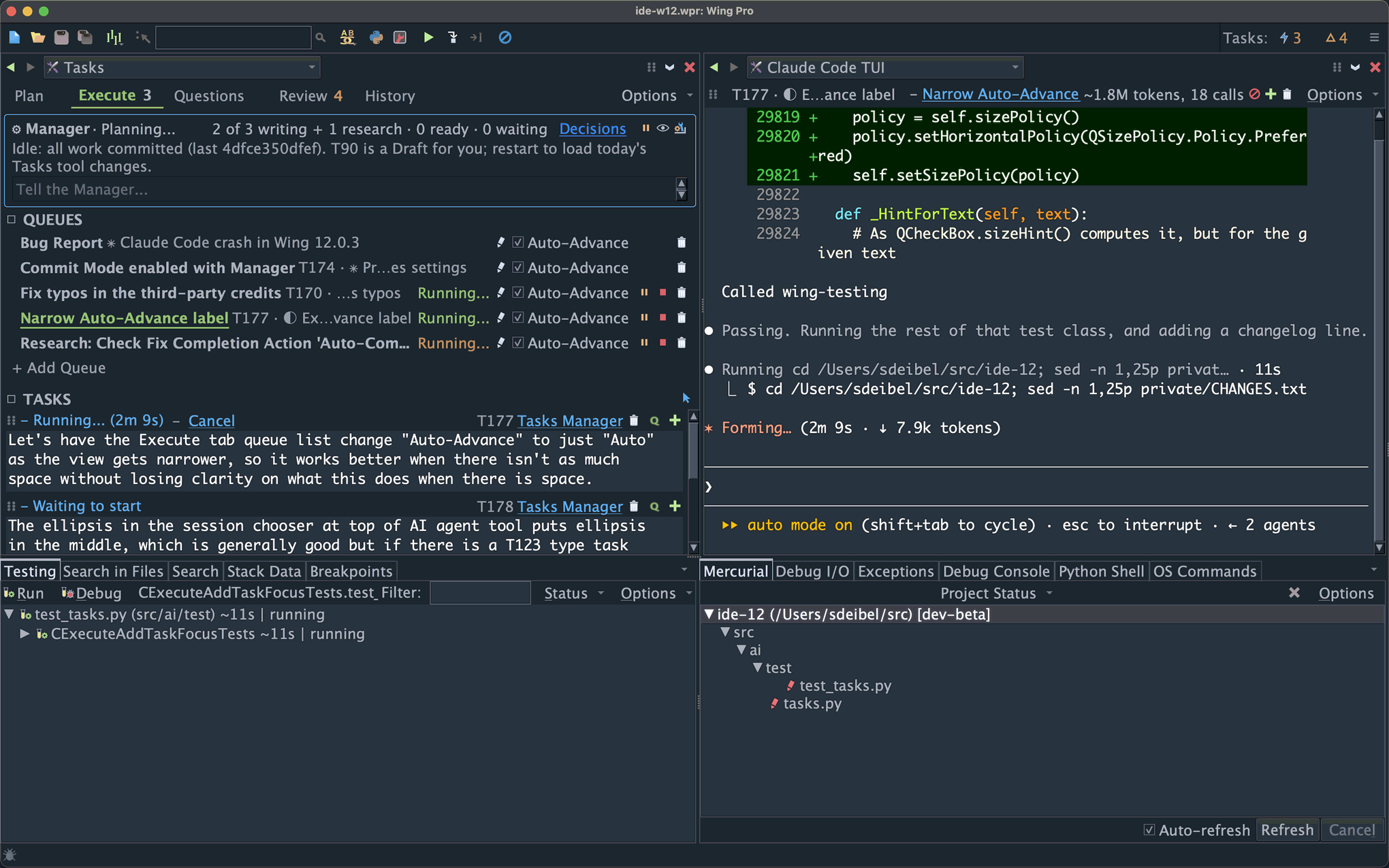
The Tasks Manager accepts anything from a bug report to a high-level specification for a new software product. It breaks down larger tasks, maps out an implementation strategy, decides what tasks can safely run at the same time, dispatches the work to AI worker agents, collects questions that need your attention, tracks problems the agents find along the way, and lines up the results for your review.
You remain in control at whatever level you're comfortable with: inspect every change in the code, read a high-level task summary and react to choices made by the agents, or simply try the result and give instructions for further development.
Wing Pro 12.1 also introduces support for other AI coding agents, now including Claude Code, Codex, Antigravity, Copilot, Cursor, goose, and OpenCode, plus any other agent that speaks the Agent Client Protocol (ACP).
The Tasks Manager and AI agent support are features of Wing Pro only. Other improvements in Wing 12.1, such as the new Modern look and display themes, are also in Wing Classic and Wing 101, as described below.
Downloads
This is a beta release. Please try it and email us if you find problems or have suggestions!
Wing 12.1.0 -- Full featured Python IDE with two licensing tiers
Wing 101 12.1.0 -- Free IDE for teaching beginners to program
Wing 12.1 will replace Wing 12.0 when it is installed. You can revert to Wing 12.0 by reinstalling it at any time.
To get started quickly with autonomous development in Wing 12.1, see Getting Started with Autonomous Development.
New in Wing 12.1
Autonomous Development with the Tasks Manager
The new Tasks Manager is an agent that runs the Tasks tool's queues for you, so that development proceeds autonomously under your direction. You write tasks, mark the ones you want started as Ready, and review what comes back.
The Manager can break down high-level specifications into a design and development plan. It decides task order, serializes those that are likely to edit the same files, and runs closely related tasks in shared session context. It can message a running agent to tell it about related work or new insights, or redirect it if it goes astray.
While the Manager is on, tasks run autonomously: Rather than stopping to ask questions or present intermediate results, each works as far as it can and ends with a report of the judgement calls it made along the way, and any questions it has left. A new Questions tab in the Tasks tool collects everything that is waiting for you, so you can provide answers in one place. Follow-up work and problems that agents notice as they run are added to the Plan tab of the Tasks tool as new tasks. It may automatically start found tasks that are closely related to ongoing work; others wait for your review.
You remain the one who decides which work runs, how much the Manager can do, and how results are reviewed. Every change the Manager makes is listed and can be reverted or revised, even after they are committed. You can also talk to the Manager to ask why a task is being held, sort out a stuck queue, or give it special instructions about your development workflow.
Your Choice of AI Agent
Claude Code and Codex (run using its TUI) are best for autonomous development, since they self-check the safety of commands that they run. Antigravity, Copilot, and Cursor also work but don't implement the same level of safety checks. goose and OpenCode are not recommended for autonomous development. AI Agent Safety in the AI Agent-Assisted Development chapter of the manual in Wing 12.1's Help menu compares the agents in detail.
Each agent can run in one of two ways. A TUI session runs the agent's own terminal user interface inside Wing's AI Agent tool, and is the recommended way to use every agent that has one. An ACP session talks to the agent over the Agent Client Protocol and renders in Wing's AI agent conversation UI. Goose and some other agents work only through ACP.
Every agent gets Wing's MCP servers for code analysis, debugging, testing, and review, along with development guides that teach it how to work with Wing. The AI Agent tool, the Tasks tool, FIX and code actions, Write Tests, the review workflow, commit modes, the testing regimen, and autonomous task queueing all work the same way with every agent.
Each queue in the Tasks tool can use a different agent. Agents may run on the same host as the IDE or on a remote host.
You bring your own subscription or API key for the agent you choose. Wing does not install agents or provide access to models.
Other Improvements
User Interface: An optional new Modern look redesigns the toolbar, Preferences dialog, status bar, and tab overflow, and improves the display font. A welcome window lets you choose what to open at startup. Two new display themes, Night Flight and Solo Flight, have been added. Themes can now be imported from VS Code, created from a small set of colors, or exported from your current color configuration.
Tasks Tool (Wing Pro): New Checklists hold recurring reviews, fixes, and release and deployment steps. A task's committed changes can now be reverted, edited, or commented on. Every task has a short ID that links to the task wherever it is cited, and mini-search works on every tab. Tracking of changes made by concurrently running tasks is more reliable, and there are many other fixes to task and session management.
Version Control (Wing Pro and Wing Classic): The Git and Mercurial logs now show a graphical history with expandable diffs, Project Log replaces Show Changeset, and the editor can show annotations with commit message tooltips.
Editor and Analysis: In all products, the editor's scroll bar shows marks for diffs, search matches, and errors and warnings. In Wing Pro and Wing Classic, source analysis is faster and its database is about 30% smaller.
Other Changes: Wing now offers to remove large cache directories left behind by older versions. Accept Debug Connections has moved to Project Properties so it is set per project.
Wing 12.1 also includes many bug fixes, particularly for remote development and Docker containers, debugging free-threaded Python on Windows, git worktrees and submodules, non-ASCII text on Windows, unit test discovery, and display themes. See the change log for details.
To get started quickly with autonomous development in Wing 12.1, see Getting Started with Autonomous Development, which also covers usage hints and known limitations of this beta release.
If you have questions, please don't hesitate to contact us at support@wingware.com.
Python Insider
Python 3.15.0 (final) is here!
A brand new Python here for you to enjoy!
October 08, 2026
Anarcat
PSA: Europe changes time forward soon, North America next, for the last time?
This is a copy of an email I sent at work. I'm not sure I should be making noise about this here, feedback welcome.
This is your bi-yearly reminder that time is changing soon! October 25th in Europe, November 1st in North America. Less people in Canada are changing this year, with BC, Alberta, Manitoba and Northwest Territories getting rid of DST.
What's happening?
Some places in the world implement what is called Daylight saving time or DST:
https://en.wikipedia.org/wiki/Daylight_saving_time
Normally, you shouldn't have to do anything: computers automatically change time following local rules, assuming they are correctly configured, provided recent updates have been applied in the case of a recent change in said rules (because yes, this happens, and happened this year, and yes, you need to upgrade your software!).
Of course, appliances like your microwave oven will likely not change time and will need to adjusted unless they are so-called "smart", in which case they are part of the skynet botnet and should be destroyed.
If your clock is flashing "0:00" or "12:00", you have no action to take to adapt to this change, lucky you.
If you haven't changed time in six months, congratulations, your clock will be accurate again!
In any case, you should still consider DST because it might affect some of your meeting schedules, particularly if you set up a new meeting schedule in the last 6 months and forgot to consider this change.
If your location does not have DST
Properly scheduled meetings affecting multiple time zones are set in UTC time, which does not change. So if your location does not observer time changes, your (local!) meeting time will not change.
But be aware that some other folks attending your meeting might have the DST bug and their meeting times will change.
Be kind to those poor souls which might be missing meetings by a full hour because time flies backwards for them.
If you do observe DST
If you are affected by daylight savings, your local meeting times will change for UTC meetings. Normally, your meeting times are scheduled to take this into account and the new hours should be reasonable.
But now is a good time to verify that. Take a look at your schedule for the next couple of weeks and reschedule meetings before the daylight saving come up to avoid too much disruption. You have only a couple of weeks to do so right now.
When do times change, how, and and where?
As regular readers will remember, the rule of thumb is:
Spring forward, fall backwards.
That is, during the season of Spring, the clocks move forward, and during the Fall (like right now), they move backwards. That is in the northern hemisphere, but then the southern hemisphere is often saner and doesn't switch anyways.
So time will move backwards which means an extra hour of sleep. Unless you have children or bad sleep, in which case your body doesn't care about what the clock says and will wake up one hour earlier than what it should.
And of course, this doesn't happen everywhere at once, so let's see when it happens where.
Europe
The dance starts in Europe.
The change happens on the last Sunday in October at 01:00 UTC (not local time!), that is October 25th. If you are in the central European timezone, also known as Amsterdam, Berlin, or Paris time depending on your national affiliation, that essentially means that at 2:59 local the clocks will fall back to 2:00 instead of going to 3:00.
Concretely, set your watch back one hour before going to bed, go to bed at the normal time, and enjoy an extra hour of sleep or leisure.
If you have kids, you might want to start getting them to bed slightly earlier every day for a week before the change so they take time getting used to the change. If you have trouble sleeping in the morning, find your inner child and do that to yourself as well.
USA / Canada
Then it's the US[1] and Canada[2] joining the dance, on the First Sunday in November at 02:00 local (not UTC!), that is, I believe, November 1st 2025.
This means that, at 1:59, the clocks will flip to 1:00, instead of 2:00.
Concretely, do like the Europeans and tweak your clock before going to bed.
That is a little less than four weeks from now.
[1] except Arizona (except the Navajo nation), US territories, and Hawaii
[2] except Yukon, Saskatchewan, (newly) British Columbia, (newly) Alberta, (newly) Northwest Territories, (newly) Manitoba, one island in Nunavut (Southampton Island), one town in Ontario (Atikokan) and small parts of Quebec (Le Golfe-du-Saint-Laurent)
Other places with DST
This time again, I must apologize to the people of Cuba, Lebanon, Israel, Palestine, Egypt, Chile, Australia, and New Zealand, as you fine folks all have your own DST rules that are omitted here for brevity. I rely on this page from Wikipedia to be updated by time nerds accurately for this message, and it should provide you with a rough idea of what's coming:
https://en.wikipedia.org/wiki/Daylight_saving_time_by_country
In general, changes also happen in October, but either on different times or different days, except in the south hemisphere, where they might happen in September (oops, sorry NZ folks, I'm late!).
Places without DST
Everyone else, enjoy, you're on the right side of history, and we thank you for the good example you give us.
Changes since last time
There's been lots of changes since last time:
British Columbia moved to permanent -07 on 2026-03-09, that is it will not change to normal time in November
Alberta moved to permanent -06 on 2026-06-18, similar to BC above.
Canada’s Northwest Territories moved to permanent -06 on 2026-08-21, matching Alberta.
Manitoba moves to permanent -05 on 2026-10-31.
Morocco moves to permanent +00 on 2026-09-20.
Moldova has used EU transition times since 2022, but the tz database only noticed in 2026
This is my interpretation of the changes announced on the tzdata mailing list here:
https://lists.iana.org/hyperkitty/list/tz-announce@iana.org/latest
If the eastward trend continues, Canada should adopt country-wide "no daylight savings" rules by 2027, although there's actually no sign of the other provinces (Ontario, Québec and so on) currently running bills to change those rules just yet. Poor Canadians like me confused about time in their countries can refer to this section of Wikipedia for details:
https://en.wikipedia.org/wiki/Daylight_saving_time_in_Canada#By_province_and_territory
... and particularly the image featured there:
https://commons.wikimedia.org/wiki/File:Canada_time_zone_map-en.svg
It also seems like the US government might finally adopt a permanent daylight saving change bill in 2026, as the "Sunshine protection act" pass the house in July:
https://en.wikipedia.org/wiki/Sunshine_Protection_Act
True to form, this was associated with absolutely ridiculous pressure from Donald Trump against republicans (his own party!) objecting to the change:
On July 14, 2026, the House passed a Sunshine Protection Act bill backed by President Trump. Nevertheless, the bill was opposed in the Senate by Republicans, including Senator Cotton. In response, on October 3, 2026, Trump shared a post on Truth Social urging Cotton to approve the bill, where he revealed Cotton's personal cellphone number and called on people to call him.
https://www.theguardian.com/us-news/2026/oct/03/trump-tom-cotton-daylight-saving-time
Given that the last time the US did a major change to the daylight savings policy (in 2005), Canada followed suit to stay in sync, it's quite possible Trump's mad dash might actually finish getting rid of DST in North America:
https://en.wikipedia.org/wiki/Energy_Policy_Act_of_2005#Change_to_daylight_saving_time
Django Weblog
Django security reporting update
We are no longer accepting new security reports for the Django project through HackerOne. Existing reports submitted through HackerOne will remain open and continue to be handled by the Django Security Team.
If you discover a security issue in Django, please follow the reporting process described in the Django security policies.
Security issues should be reported by emailing security@djangoproject.com
Eli Bendersky
Monte-Carlo simulations
Monte Carlo simulations (or methods) is the technique of applying randomness and the Law of large numbers to the solution of various scientific and engineering problems. One of its first documented uses was by Stanislaw Ulam and John von Neumann for nuclear weapon simulations after WWII [1].
In this post I want to provide examples of some simple uses of Monte Carlo simulations. We'll start with the classical example of calculating the value of \pi by throwing darts.
Estimating pi
Suppose we take a square board and inscribe a quarter of a circle into it. We then proceed to throw darts at the board and record whether each dart hits inside or outside the quarter circle. Having thrown many such darts, we calculate the ratio of the darts inside the circle to the total number thrown.
Assuming our darts are distributed uniformly over the square, by the Law of large numbers this ratio should approach the ratio of areas of the quarter circle A_{circ} to the full square A_{square}.
With a square side length of 1, we have:
\[\frac{A_{circ}}{A_{square}}=\frac{\pi/4}{1}=\frac{\pi}{4}\]Therefore:
\[\pi\approx 4\frac{\text{hits inside}}{\text{total throws}}\]Here's a visualization:
π ≈ —
Change the number of samples (dart throws) and click "Run" to regenerate. The code is very simple - here's a slightly sanitized version:
const total = Number(samples.value);
let inside = 0;
for (let i = 0; i < total; i++) {
  const x = Math.random();
  const y = Math.random();
  const inCircle = x * x + y * y <= 1;
  if (inCircle) inside++;
}
estimateValue = 4 * inside / total;
You'll notice that the estimate is relatively poor - even with 1000 samples - if you click "Run" several times, some numbers will be way off mark. While this method does estimate \pi, it's not a particularly good estimate. I find that running ~10 billion samples is necessary to estimate it to 4 digits after the decimal with reasonable reliability.
In general, for independent trials like these, the typical sampling error decreases in proportion to 1/\sqrt{N}, where N is the number of trials. This means that halving the error requires four times as many samples.
While the \pi estimation may seem whimsical, it's an example of an important class of problems to which Monte Carlo simulation is applied: numerical integration. Our simulation estimates the area under the quarter-circle curve, which is a definite integral.
Many integrals are very difficult to solve analytically, and much research has been done in the area of numerical analysis to develop methods to calculate integrals. Monte Carlo methods are particularly useful for high-dimensional integrals, where other numerical methods can become prohibitively expensive.
Combinatorial simulation - the game of SET
A common use of Monte Carlo methods is estimating complex combinatorial calculations. These often don't have analytical solutions, and enumerating all options is intractable due to the scale of the numbers involved. As an example, let's consider the game of SET. Each SET card has four attributes:
- Number of shapes (1, 2 or 3)
- Color (Red, Green or Purple)
- Shape type (Oval, Diamond or Squiggle)
- Shading (Empty, Striped or Solid)
And the goal is to find a "set" - three cards that are either all different or all the same for each attribute separately. As an example, here's a hand with a single set; see if you can find it [2]:
SET hand with a single setAnd the next hand doesn't have any sets:
SET hand with no handsHere's a question: given a freshly shuffled SET deck, what are the odds that the first 12 cards drawn will have no sets among them? This question is difficult to answer without using a computer.
It's easy to calculate the number of ways to deal a 12-card hand from a deck of 81:
\[\binom{81}{12}=70,724,320,184,700\]But how many of these hands have no sets? Enumerating 70 trillion SET hands and checking each one can take quite a while, and there is no straightforward counting formula to answer this question. Some clever methods can be employed to leverage symmetries and other mathematical properties of SET to cut down this search space considerably. Donald Knuth himself worked on this problem and came up with a neat program (setset-all on his programs page) that found 2,284,535,476,080 such hands. Therefore, the answer to our question is:
\[\frac{2,284,535,476,080}{70,724,320,184,700}\approx 0.0323\]There's a 3.23% chance that a randomly drawn hand of 12 cards from a full deck of SET will have no set in it.
Let's see how we can use a Monte Carlo simulation to answer this question with relatively small effort, without deep knowledge of the mathematical properties of SET that enable cutting down the search space Knuth-style. We can use the following pseudo-code:
C = 0
run N times:
  draw a random 12-card hand from a fresh deck
  count sets in the hand
  if no sets:
    C += 1

Estimated probability = C / N
After running 10 million simulated draws, I got an answer of 0.0323, which matches the real answer very closely.
The Monte Carlo approach lets us solve rather complicated problems in a very simple way. Suppose we want to answer the same question for a hand of 15 cards; this would blow up the search space considerably - there are about 100x more ways to select 15-card hands than there are to select 12-card hands. But for a Monte Carlo simulation, we adjust one small parameter and get a very reliable [3] answer (about 0.00037, in case you were wondering).
Retirement projection
One domain where Monte Carlo simulations are ubiquitous is projections for retirement portfolios. Suppose someone prepares to retire with a total sum of 1 million dollars in their portfolio; they'd like to be able to draw $30,000 a year from the portfolio for their living expenses. Would that work?
There's a large number of factors to take into account when analyzing this question, but for simplicity let's focus on just two: portfolio return and inflation. We can run a naive estimate, assuming average values: suppose an average yearly portfolio return of 4%, and average yearly inflation of 2% [4]
Let's denote our portfolio return as r=0.04, and inflation as q=0.02. Then the real return each year is:
\[r^{\mathrm{real}}=\frac{1+r}{1+q}-1\approx0.0196\]Starting with $1,000,000, at the end of the year we'll have $1,019,600 and then draw $30,000 for living expenses [5], ending with $989,600. If we continue this way, the money runs out after ~55 years, which means that a person retiring at the age of 65 should be reasonably safe, right?
But this is very simplistic; assuming just average returns is risky, because they do a poor job of representing reality, and many factors have uncertainty. For example, the sequence of returns matters a lot; a bad year (-10%) followed by a great year (+18%) would still count as "4% on average" but produces significantly less money than two consecutive +4% years. Inflation is also unpredictable, and sometimes correlated with portfolio returns; there could be bad years of high inflation and low / volatile returns that can wreak havoc on a portfolio.
As we add factors (variance in yearly draws, mixed portfolios of stocks, bonds, real estate, life expectancy, unexpected events, changing tax laws etc.), relying on a single average estimate becomes increasingly more fraught. This is why Monte Carlo simulations are very popular in this domain: by drawing from reasonable distributions based on historical data, a Monte Carlo simulation can easily run a million different scenarios and provide estimates: for example, what are the odds of money running out before death.
Here's a useful chart from a simulation I ran:
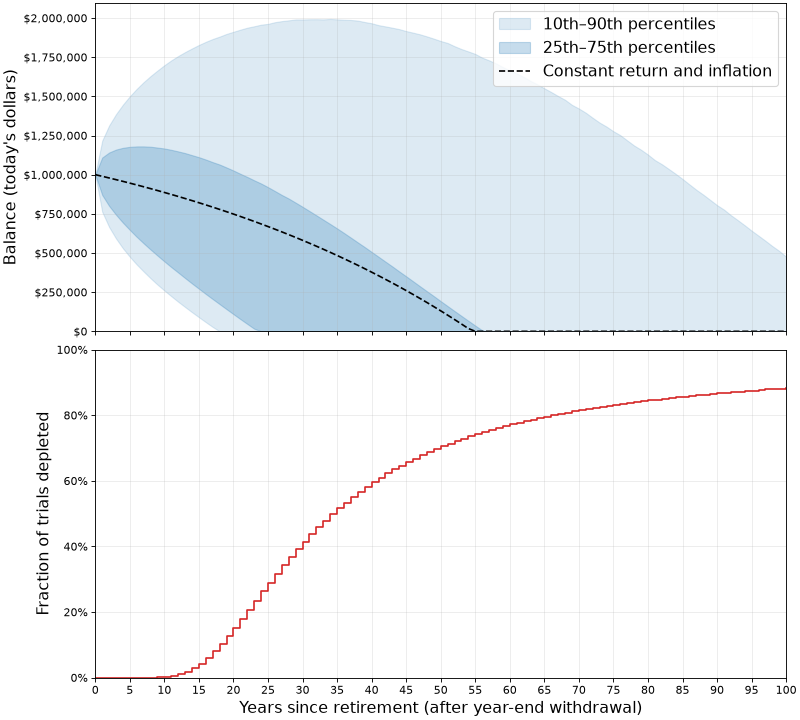
In the top chart:
- The dashed line shows the constant assumptions mentioned before: what happens when yearly return is always 4% and inflation is always 2%.
- The shaded blue areas demonstrate the outcomes of 1,000,000 simulations where inflation and return numbers are drawn from reasonable normal distributions based on historical data. We see that in 25% of the cases, all money ran out by roughly 22 years.
In the bottom chart:
- It's even easier to see how long the funds last; if we're interested in knowing, say, what are the odds that this plan will have enough money for 30 years - the chart shows it's about 60% (since in 40% of the simulations the funds were depleted at this point).
Looking a this simulation, under the current assumptions the plan sounds much riskier than the average assumption makes it appear. Assuming that a 65-y.o. person would plan for 25 years of retirement until death, the ~30% odds of not having sufficient funds for this duration of time are sobering. Perhaps a change in plans is needed (such as a more frugal lifestyle or securing additional funds in some way).
Retirement projection is only one of may ways in which Monte Carlo simulations are used for financial and economical applications; given the high uncertainty of these domains, it's very difficult to plan using analytical calculations. Company sales projections, growth projections, stock offering prices and much more uses Monte Carlo simulations to arrive at estimates with reasonable error bars.
Code
All the code for the explorations in this post is available on GitHub.
| [1] | While these techniques were conceptually understood much earlier, it's not surprising that their first real applications coincided with the development of the first digital computers. As we'll see later in the post, Monte Carlo simulations benefit from running large numbers of trials to get reasonable accuracy. |
| [2] | The answer is: three empty red diamonds, three solid purple ovals, three striped green squiggles. Note that for each of the 4 SET attributes, these three cards are either all the same or all different. |
| [3] | For the same number of trials, this estimate has greater relative uncertainty than the 12-card estimate, because we encounter far fewer hands without a set. |
| [4] | For the examples in this post, we'll be using real dollars, or today's value of the money. We'll assume that the $30,000 yearly draw doesn't change and will instead apply inflation to the portfolio itself. |
| [5] | More sophisticated simulations would let us control these parameters; for example, are the expense funds drawn at the beginning or end of each year, or distributed on a monthly basis? |
October 07, 2026
LernerPython blog, from Reuven Lerner
Pandas groupby with two columns: Reshape results with unstack
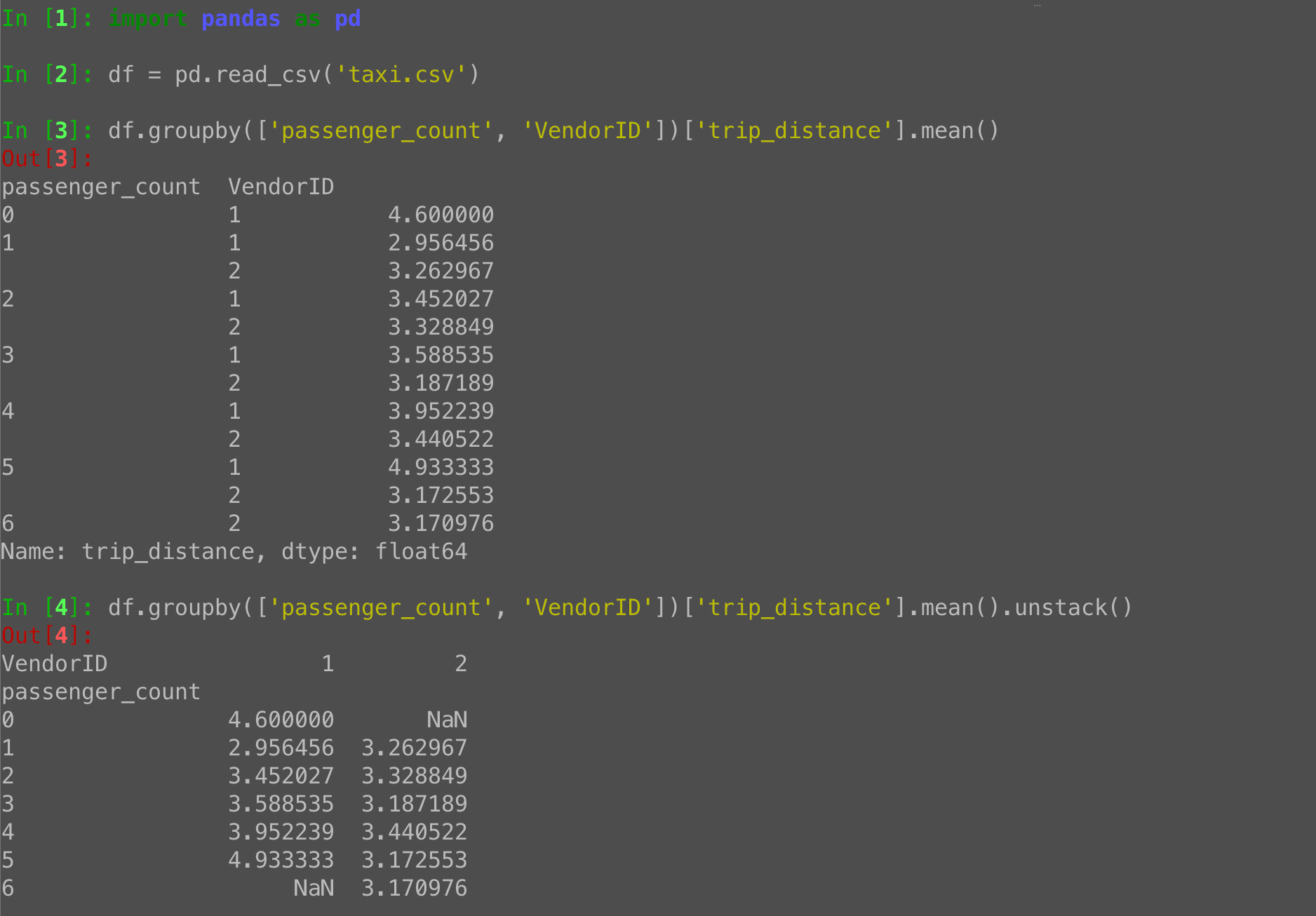
Invoke “groupby” with two categorical columns in Python Pandas, and get a two-part multi-index:
g = df.groupby(['passenger_count', 'VendorID'])['trip_distance'].mean()Turn into a data frame with unstack:
g.unstack() # index 0-6 (passenger_count), columns 1-2 (VendorID)The post Pandas groupby with two columns: Reshape results with unstack appeared first on LernerPython.
Python GUIs
Change the color of the ProgressBar indicator text when it exceeds 50%
How can I change the text color from black to white of the percentage indicator inside the
QProgressBarwhen it exceeds the value of 50?
When a QProgressBar fills past the halfway mark, the dark-colored chunk behind the text can make the default black percentage label hard to read. A common solution is to switch the text color to white once the value crosses 50%. Let's walk through how to do this in PyQt5 using stylesheets and a signal connection.
Why the text becomes hard to read
By default, QProgressBar draws its percentage text on top of the bar. When the colored "chunk" is small, the text sits against a light background and black text is fine. As the chunk grows and fills most of the bar, the text ends up on top of a dark background — and black-on-dark is difficult to see.
The fix is straightforward: watch for value changes and update the stylesheet to swap the text color at the right moment.
Styling the QProgressBar text
The text color on a QProgressBar is controlled by the color property on the QProgressBar selector itself — not on QProgressBar::chunk. The ::chunk sub-control only styles the filled portion of the bar (its background color, border, etc.), while color on QProgressBar sets the text color.
Here's a quick example of setting the text to white:
self.progress_bar.setStyleSheet("QProgressBar { color: white; }")
And setting it back to black:
self.progress_bar.setStyleSheet("QProgressBar { color: black; }")
Responding to value changes
QProgressBar emits a valueChanged signal every time its value updates. You can connect a slot to this signal that checks the current value and applies the appropriate stylesheet.
self.progress_bar.valueChanged.connect(self.update_progress_text_color)
Then define the slot:
def update_progress_text_color(self, value):
    if value > 50:
        self.progress_bar.setStyleSheet("""
            QProgressBar {
                color: white;
            }
        """)
    else:
        self.progress_bar.setStyleSheet("""
            QProgressBar {
                color: black;
            }
        """)
Each time the value changes, this method checks whether it's above 50 and sets the text color accordingly.
Preserving other styles
If you already have a stylesheet on your progress bar (for example, customizing the chunk color or the bar's border), you'll want to include those properties in both branches so they aren't lost when the stylesheet is replaced. Every call to setStyleSheet() replaces the previous stylesheet entirely.
For example:
BASE_STYLE = """
    QProgressBar {
        border: 1px solid grey;
        border-radius: 5px;
        text-align: center;
    }
    QProgressBar::chunk {
        background-color: #4CAF50;
        border-radius: 5px;
    }
"""

def update_progress_text_color(self, value):
    if value > 50:
        color_style = "QProgressBar { color: white; }"
    else:
        color_style = "QProgressBar { color: black; }"

    self.progress_bar.setStyleSheet(BASE_STYLE + color_style)
Because the color_style rule comes after BASE_STYLE, it overrides the text color while keeping everything else intact.
Complete working example
Here's a full PyQt5 application you can copy and run. It uses a QTimer to increment the progress bar automatically so you can see the text color flip from black to white as the bar crosses 50%.
import sys
from PyQt5.QtWidgets import (
    QApplication, QWidget, QVBoxLayout, QProgressBar, QPushButton,
)
from PyQt5.QtCore import QTimer


BASE_STYLE = """
    QProgressBar {
        border: 1px solid grey;
        border-radius: 5px;
        text-align: center;
        font-size: 14px;
    }
    QProgressBar::chunk {
        background-color: #3874f2;
        border-radius: 5px;
    }
"""


class MainWindow(QWidget):
    def __init__(self):
        super().__init__()
        self.setWindowTitle("QProgressBar Text Color Demo")
        self.resize(400, 120)

        layout = QVBoxLayout()
        self.setLayout(layout)

        self.progress_bar = QProgressBar()
        self.progress_bar.setMinimum(0)
        self.progress_bar.setMaximum(100)
        self.progress_bar.setValue(0)
        self.progress_bar.setStyleSheet(BASE_STYLE + "QProgressBar { color: black; }")
        layout.addWidget(self.progress_bar)

        self.start_button = QPushButton("Start")
        self.start_button.clicked.connect(self.start_progress)
        layout.addWidget(self.start_button)

        self.progress_bar.valueChanged.connect(self.update_progress_text_color)

        self.timer = QTimer()
        self.timer.timeout.connect(self.advance_progress)

    def start_progress(self):
        self.progress_bar.setValue(0)
        self.timer.start(50)

    def advance_progress(self):
        current = self.progress_bar.value()
        if current >= 100:
            self.timer.stop()
            return
        self.progress_bar.setValue(current + 1)

    def update_progress_text_color(self, value):
        if value > 50:
            color_style = "QProgressBar { color: white; }"
        else:
            color_style = "QProgressBar { color: black; }"

        self.progress_bar.setStyleSheet(BASE_STYLE + color_style)


app = QApplication(sys.argv)
window = MainWindow()
window.show()
sys.exit(app.exec_())
When you run this, click Start and watch the percentage label. While the bar is at 50% or below, the text is black. The moment it passes 50%, the text switches to white, keeping it readable against the blue chunk.
You can adjust the threshold, the colors, or even add a gradual transition by checking at multiple thresholds — the same pattern applies. Connect to valueChanged, check the value, and set the stylesheet accordingly.
For an in-depth guide to building Python GUIs with PyQt5 see my book, Create GUI Applications with Python & Qt5.
Using Complex Data Sources with PyQt6 Model/View Architecture — How to use JSON, nested data, and other complex structures in your Qt table and list views
I have a complex data set in a JSON file. Is it possible to use this as my model's data in PyQt6 views, or do I need to simplify it to a basic table?
Great news: you can use any data structure you like in a PyQt6 model. JSON files, nested dictionaries, lists of objects, database results — it all works. The model acts as an interface between how you store your data and how Qt expects to see it. As long as your model returns data in the format Qt expects, the view will display it without complaint.
In this tutorial, we'll walk through how to load a JSON file and display its data in a QTableView using a custom QAbstractTableModel. Along the way, you'll see how the model translates between your real-world data and Qt's row-and-column view of the world.
How Model/View Works with Complex Data
Qt's Model/View architecture separates data from presentation. The view (e.g. QTableView, QListView) asks the model questions like:
- "How many rows are there?"
- "How many columns are there?"
- "What's the data at row 2, column 3?"
Your model answers these questions by looking at whatever underlying data structure you're using. The view doesn't care whether your data lives in a flat list, a JSON file, a pandas DataFrame, or a SQL database. It only cares about the answers.
This means you can wrap any data source in a model. You just need to translate between your data's shape and the row/column format that Qt uses.
A Simple JSON Example
Let's start with a straightforward example. Suppose you have a JSON file containing a list of people, where each person has several fields:
[
    {
        "name": "Alice",
        "age": 34,
        "city": "Berlin",
        "role": "Engineer"
    },
    {
        "name": "Bob",
        "age": 28,
        "city": "London",
        "role": "Designer"
    },
    {
        "name": "Charlie",
        "age": 41,
        "city": "New York",
        "role": "Manager"
    },
    {
        "name": "Diana",
        "age": 25,
        "city": "Tokyo",
        "role": "Developer"
    }
]
Save this as people.json in the same directory as your Python script.
Each object in the list becomes a row in the table, and each field becomes a column. The model's job is to map between these two representations.
Building the Model
To display this data in a QTableView, we subclass QAbstractTableModel and implement three required methods:
rowCount()— returns the number of rowscolumnCount()— returns the number of columnsdata()— returns the data for a given row and column
Here's how that looks:
import json
from PyQt6.QtCore import Qt, QAbstractTableModel


class JsonTableModel(QAbstractTableModel):
    def __init__(self, data, headers=None):
        super().__init__()
        self._data = data
        # Use provided headers, or extract keys from the first item.
        if headers:
            self._headers = headers
        elif data:
            self._headers = list(data[0].keys())
        else:
            self._headers = []

    def rowCount(self, parent=None):
        return len(self._data)

    def columnCount(self, parent=None):
        return len(self._headers)

    def data(self, index, role=Qt.ItemDataRole.DisplayRole):
        if role == Qt.ItemDataRole.DisplayRole:
            row = self._data[index.row()]
            key = self._headers[index.column()]
            return str(row.get(key, ""))
        return None

    def headerData(self, section, orientation, role=Qt.ItemDataRole.DisplayRole):
        if role == Qt.ItemDataRole.DisplayRole:
            if orientation == Qt.Orientation.Horizontal:
                return self._headers[section].capitalize()
        return None
Let's walk through what's happening here.
The __init__ method stores the list of dictionaries and figures out the column headers. If you don't provide headers explicitly, it grabs the keys from the first dictionary in the list.
The rowCount() method returns the length of the data list — one row per dictionary.
The columnCount() method returns the number of headers — one column per key.
The data() method is where the translation happens. Qt calls this method with an index (which contains a row and column number) and a role (which describes what kind of data Qt wants). For display purposes, we use Qt.ItemDataRole.DisplayRole. We look up the right dictionary from the list using the row number, then look up the right value using the column header as a key.
The headerData() method provides labels for the column headers at the top of the table.
Displaying the Data
Now let's wire everything together in a small application:
import sys
import json

from PyQt6.QtWidgets import QApplication, QMainWindow, QTableView
from PyQt6.QtCore import Qt, QAbstractTableModel


class JsonTableModel(QAbstractTableModel):
    def __init__(self, data, headers=None):
        super().__init__()
        self._data = data
        if headers:
            self._headers = headers
        elif data:
            self._headers = list(data[0].keys())
        else:
            self._headers = []

    def rowCount(self, parent=None):
        return len(self._data)

    def columnCount(self, parent=None):
        return len(self._headers)

    def data(self, index, role=Qt.ItemDataRole.DisplayRole):
        if role == Qt.ItemDataRole.DisplayRole:
            row = self._data[index.row()]
            key = self._headers[index.column()]
            return str(row.get(key, ""))
        return None

    def headerData(self, section, orientation, role=Qt.ItemDataRole.DisplayRole):
        if role == Qt.ItemDataRole.DisplayRole:
            if orientation == Qt.Orientation.Horizontal:
                return self._headers[section].capitalize()
        return None


class MainWindow(QMainWindow):
    def __init__(self):
        super().__init__()
        self.setWindowTitle("JSON Table Model")

        # Load data from the JSON file.
        with open("people.json", "r") as f:
            data = json.load(f)

        # Create the model and view.
        self.model = JsonTableModel(data)
        self.table = QTableView()
        self.table.setModel(self.model)

        self.setCentralWidget(self.table)
        self.resize(500, 300)


app = QApplication(sys.argv)
window = MainWindow()
window.show()
sys.exit(app.exec())
Run this and you'll see a table view displaying the data from your JSON file, complete with column headers.
Working with Nested JSON
Real-world JSON is often more complex than a flat list of objects. You might have nested structures like this:
[
    {
        "name": "Alice",
        "age": 34,
        "address": {
            "city": "Berlin",
            "country": "Germany"
        },
        "skills": ["Python", "C++"]
    },
    {
        "name": "Bob",
        "age": 28,
        "address": {
            "city": "London",
            "country": "UK"
        },
        "skills": ["JavaScript", "CSS"]
    }
]
Save this as people_nested.json.
A QTableView is inherently a flat, two-dimensional grid. You can't directly display nested structures in it, but you can flatten the data in your model. The model is the perfect place to do this — your original data stays complex, but the model presents a simplified view to Qt.
Here's a model that handles nested dictionaries by using dot-notation column definitions:
class NestedJsonTableModel(QAbstractTableModel):
    def __init__(self, data, columns):
        super().__init__()
        self._data = data
        # columns is a list of tuples: (header_label, key_path)
        # key_path is a dot-separated string like "address.city"
        self._columns = columns

    def rowCount(self, parent=None):
        return len(self._data)

    def columnCount(self, parent=None):
        return len(self._columns)

    def _resolve(self, obj, key_path):
        """Walk into a nested dict using a dot-separated path."""
        keys = key_path.split(".")
        for key in keys:
            if isinstance(obj, dict):
                obj = obj.get(key, "")
            else:
                return ""
        return obj

    def data(self, index, role=Qt.ItemDataRole.DisplayRole):
        if role == Qt.ItemDataRole.DisplayRole:
            row = self._data[index.row()]
            _, key_path = self._columns[index.column()]
            value = self._resolve(row, key_path)
            # Handle lists by joining them into a string.
            if isinstance(value, list):
                return ", ".join(str(v) for v in value)
            return str(value)
        return None

    def headerData(self, section, orientation, role=Qt.ItemDataRole.DisplayRole):
        if role == Qt.ItemDataRole.DisplayRole:
            if orientation == Qt.Orientation.Horizontal:
                label, _ = self._columns[section]
                return label
        return None
The _resolve method walks through the nested dictionary using a dot-separated path. So "address.city" first looks up "address" (getting a nested dict), then looks up "city" inside that. This keeps the logic clean and reusable.
You define the columns you want to display when creating the model:
columns = [
    ("Name", "name"),
    ("Age", "age"),
    ("City", "address.city"),
    ("Country", "address.country"),
    ("Skills", "skills"),
]

with open("people_nested.json", "r") as f:
    data = json.load(f)

model = NestedJsonTableModel(data, columns)
This approach gives you full control over which parts of your data appear in the table and in what order. Your JSON stays as-is — the model handles the mapping.
Complete Working Example with Nested Data
Here's the full application with the nested JSON model:
import sys
import json

from PyQt6.QtWidgets import QApplication, QMainWindow, QTableView
from PyQt6.QtCore import Qt, QAbstractTableModel


class NestedJsonTableModel(QAbstractTableModel):
    """A table model that can display data from nested JSON structures."""

    def __init__(self, data, columns):
        super().__init__()
        self._data = data
        # columns: list of (header_label, dot_separated_key_path)
        self._columns = columns

    def rowCount(self, parent=None):
        return len(self._data)

    def columnCount(self, parent=None):
        return len(self._columns)

    def _resolve(self, obj, key_path):
        """Walk into a nested dict using a dot-separated path."""
        keys = key_path.split(".")
        for key in keys:
            if isinstance(obj, dict):
                obj = obj.get(key, "")
            else:
                return ""
        return obj

    def data(self, index, role=Qt.ItemDataRole.DisplayRole):
        if role == Qt.ItemDataRole.DisplayRole:
            row = self._data[index.row()]
            _, key_path = self._columns[index.column()]
            value = self._resolve(row, key_path)
            if isinstance(value, list):
                return ", ".join(str(v) for v in value)
            return str(value)
        return None

    def headerData(self, section, orientation, role=Qt.ItemDataRole.DisplayRole):
        if role == Qt.ItemDataRole.DisplayRole:
            if orientation == Qt.Orientation.Horizontal:
                label, _ = self._columns[section]
                return label
        return None


class MainWindow(QMainWindow):
    def __init__(self):
        super().__init__()
        self.setWindowTitle("Nested JSON Table Model")

        # Define which fields to show and how to reach them.
        columns = [
            ("Name", "name"),
            ("Age", "age"),
            ("City", "address.city"),
            ("Country", "address.country"),
            ("Skills", "skills"),
        ]

        # Load the nested JSON data.
        with open("people_nested.json", "r") as f:
            data = json.load(f)

        self.model = NestedJsonTableModel(data, columns)
        self.table = QTableView()
        self.table.setModel(self.model)

        # Resize columns to fit their contents.
        self.table.resizeColumnsToContents()

        self.setCentralWidget(self.table)
        self.resize(600, 300)


app = QApplication(sys.argv)
window = MainWindow()
window.show()
sys.exit(app.exec())
Adding Sorting with QSortFilterProxyModel
Once you have your model working, adding sorting is straightforward using QSortFilterProxyModel. This sits between your model and the view, providing sort and filter capabilities without modifying your original data. For more details on sorting and filtering tables, see our guide to sorting and filtering in Qt Model/View.
import sys
import json

from PyQt6.QtWidgets import QApplication, QMainWindow, QTableView
from PyQt6.QtCore import Qt, QAbstractTableModel, QSortFilterProxyModel


class NestedJsonTableModel(QAbstractTableModel):
    def __init__(self, data, columns):
        super().__init__()
        self._data = data
        self._columns = columns

    def rowCount(self, parent=None):
        return len(self._data)

    def columnCount(self, parent=None):
        return len(self._columns)

    def _resolve(self, obj, key_path):
        keys = key_path.split(".")
        for key in keys:
            if isinstance(obj, dict):
                obj = obj.get(key, "")
            else:
                return ""
        return obj

    def data(self, index, role=Qt.ItemDataRole.DisplayRole):
        if role == Qt.ItemDataRole.DisplayRole:
            row = self._data[index.row()]
            _, key_path = self._columns[index.column()]
            value = self._resolve(row, key_path)
            if isinstance(value, list):
                return ", ".join(str(v) for v in value)
            return str(value)
        return None

    def headerData(self, section, orientation, role=Qt.ItemDataRole.DisplayRole):
        if role == Qt.ItemDataRole.DisplayRole:
            if orientation == Qt.Orientation.Horizontal:
                label, _ = self._columns[section]
                return label
        return None


class MainWindow(QMainWindow):
    def __init__(self):
        super().__init__()
        self.setWindowTitle("Sortable JSON Table")

        columns = [
            ("Name", "name"),
            ("Age", "age"),
            ("City", "address.city"),
            ("Country", "address.country"),
            ("Skills", "skills"),
        ]

        with open("people_nested.json", "r") as f:
            data = json.load(f)

        # Create the source model.
        self.source_model = NestedJsonTableModel(data, columns)

        # Wrap it in a proxy model for sorting.
        self.proxy_model = QSortFilterProxyModel()
        self.proxy_model.setSourceModel(self.source_model)

        self.table = QTableView()
        self.table.setModel(self.proxy_model)
        self.table.setSortingEnabled(True)
        self.table.resizeColumnsToContents()

        self.setCentralWidget(self.table)
        self.resize(600, 300)


app = QApplication(sys.argv)
window = MainWindow()
window.show()
sys.exit(app.exec())
Click any column header to sort by that column. Click again to reverse the sort order. The QSortFilterProxyModel handles all of this automatically — you don't need to write any sorting logic yourself.
Summary
The Model/View architecture in PyQt6 is designed to work with whatever data you have. The model is a translation layer: it takes your data — whether it's a flat list, nested JSON, a database query, or anything else — and presents it in the row-and-column format that Qt's views expect.
When working with complex data structures, keep these principles in mind:
- Your data stays as-is. You don't need to restructure your JSON or flatten your database. The model handles the translation.
- Define your columns explicitly. For nested data, decide upfront which fields you want to display and how to reach them.
- Use helper methods. A small utility like
_resolve()keeps yourdata()method clean and makes it easy to access deeply nested values. - Layer on functionality. Use
QSortFilterProxyModelto add sorting and filtering without touching your model code.
If you're working with tabular data from pandas or numpy instead of JSON, take a look at our tutorial on displaying pandas DataFrames in QTableView. For making your table cells editable, see our guide on editing data in a PyQt6 QTableView.
For an in-depth guide to building Python GUIs with PyQt6 see my book, Create GUI Applications with Python & Qt6.
October 06, 2026
Python Bytes
#499 So many questions??
<strong>Topics covered in this episode:</strong><br> <ul> <li><strong><a href="https://peps.python.org/pep-0824?featured_on=pythonbytes">PEP 824 brings ?? and ??= to Python for None handling</a></strong></li> <li><strong><a href="https://blog.python.org/2026/10/python-3150-rc3/?featured_on=pythonbytes">Python 3.15</a> gets a surprise RC3, and <a href="https://blog.python.org/2026/10/python-31022-31117/?featured_on=pythonbytes">Python 3.10</a> reaches end of life</strong></li> <li><strong><a href="https://docs.python.org/3/library/asyncio-task.html#shielding-from-cancellation">asyncio.shield</a></strong></li> <li><strong><a href="https://github.com/kitao/pyxel?featured_on=pythonbytes">Pyxel: the retro game engine for Python</a></strong></li> <li><strong>Extras</strong></li> <li><strong>Joke</strong></li> </ul><a href='https://www.youtube.com/watch?v=uXakV6i1-wc' style='font-weight: bold;' data-umami-event="Livestream-Past" data-umami-event-episode="499">Watch on YouTube</a><br> <p><strong>About the show</strong></p> <p>Sponsored by us! Support our work through:</p> <ul> <li>Our <a href="https://training.talkpython.fm/?featured_on=pythonbytes"><strong>courses at Talk Python</strong></a></li> <li>Consulting from <a href="https://sixfeetup.com/?featured_on=pythonbytes"><strong>Six Feet Up</strong></a></li> </ul> <p><strong>Connect with the hosts</strong></p> <ul> <li>Michael: <a href="https://fosstodon.org/@mkennedy">Mastodon</a> / <a href="https://bsky.app/profile/mkennedy.codes?featured_on=pythonbytes">BlueSky</a> / <a href="https://x.com/mkennedy?featured_on=pythonbytes">X</a> / <a href="https://www.linkedin.com/in/mkennedy/?featured_on=pythonbytes">LinkedIn</a></li> <li>Calvin: <a href="https://sixfeetup.social/@calvin?featured_on=pythonbytes">Mastodon</a> / <a href="https://bsky.app/profile/calvinhp.com?featured_on=pythonbytes">BlueSky</a> / <a href="https://x.com/calvinhp?featured_on=pythonbytes">X</a> / <a href="https://www.linkedin.com/in/calvinhp/?featured_on=pythonbytes">LinkedIn</a></li> <li>Show: <a href="https://fosstodon.org/@pythonbytes">Mastodon</a> / <a href="https://bsky.app/profile/pythonbytes.fm">BlueSky</a> / <a href="https://x.com/PythonBytes?featured_on=pythonbytes">X</a></li> </ul> <p>Join us on YouTube at <a href="https://pythonbytes.fm/stream/live"><strong>pythonbytes.fm/live</strong></a> to be part of the audience. Usually <strong>Tuesday at 7am PT</strong>. Older video versions available there too.</p> <p>Finally, if you want an artisanal, hand-crafted digest of every week of the show notes in email form? Add your name and email to <a href="https://pythonbytes.fm/friends-of-the-show">our friends of the show list</a>, we'll never share it.</p> <p><strong>Michael #1: <a href="https://peps.python.org/pep-0824?featured_on=pythonbytes">PEP 824 brings ?? and ??= to Python for None handling</a></strong></p> <p>PEP 824, a new draft from Marc Mueller sponsored by Guido van Rossum, proposes None-coalescing operators for Python 3.16. The ?? operator returns its left-hand side unless that value is None, and ??= assigns a fallback only when the target is None. It revives the long-deferred <a href="https://peps.python.org/pep-0505/?featured_on=pythonbytes">PEP 505</a> from over a decade ago, trimmed to just these two operators, with None-aware access split off into PEP 823. The goal is replacing verbose is None checks with something closer to or, but keyed on None instead of truthiness.</p> <ul> <li>Every Python codebase has piles of if x is None fallback code, and this is the first serious move in ten years to give it real syntax.</li> <li>user.age ?? "unknown" is like or but only falls back on None, so 0, "", and [] pass through instead of getting clobbered</li> <li><a href="http://user.name?featured_on=pythonbytes">user.name</a> ??= "unknown" replaces the two-line check-then-assign pattern, with left-side subexpressions evaluated and cached exactly once</li> <li>Precedence sits between or and conditional expressions, matching JavaScript and C#, and ?? lands as a BoolOp in the AST next to and and or</li> <li>Unlike +=, ??= is a conditional assignment that skips the right side entirely, which is why it gets its own AST node rather than AugAssign</li> <li>Still draft status targeting 3.16, with a working reference implementation and an online demo to try, and it notably rejects a soft keyword like otherwise in favor of the familiar ??</li> <li>Discussion-worthy: the PEP answers the old objection that making None easier will proliferate its use, pointing out None is already everywhere and the status quo just produces uglier code</li> </ul> <div class="codehilite"> <pre><span></span><code><span class="c1"># OG way</span> <span class="n">user</span> <span class="o">=</span> <span class="n">db</span><span class="o">.</span><span class="n">get_user</span><span class="p">()</span> <span class="n">city</span> <span class="o">=</span> <span class="kc">None</span> <span class="k">if</span> <span class="n">user</span> <span class="ow">is</span> <span class="ow">not</span> <span class="kc">None</span><span class="p">:</span> <span class="k">if</span> <span class="n">user</span><span class="o">.</span><span class="n">address</span> <span class="ow">is</span> <span class="ow">not</span> <span class="kc">None</span><span class="p">:</span> <span class="k">if</span> <span class="n">user</span><span class="o">.</span><span class="n">address</span><span class="o">.</span><span class="n">city</span> <span class="ow">is</span> <span class="ow">not</span> <span class="kc">None</span><span class="p">:</span> <span class="n">city</span> <span class="o">=</span> <span class="n">user</span><span class="o">.</span><span class="n">address</span><span class="o">.</span><span class="n">city</span> <span class="c1"># Michael's preferred way</span> <span class="n">user</span> <span class="o">=</span> <span class="n">db</span><span class="o">.</span><span class="n">get_user</span><span class="p">()</span> <span class="n">city</span> <span class="o">=</span> <span class="n">user</span><span class="err">?</span><span class="o">.</span><span class="n">address</span><span class="err">?</span><span class="o">.</span><span class="n">city</span> </code></pre> </div> <p><strong>Calvin #2: <a href="https://blog.python.org/2026/10/python-3150-rc3/?featured_on=pythonbytes">Python 3.15</a> gets a surprise RC3, and <a href="https://blog.python.org/2026/10/python-31022-31117/?featured_on=pythonbytes">Python 3.10</a> reaches end of life</strong></p> <ul> <li>The release team added a surprise third release candidate for Python 3.15 to fix last-minute lazy-import release blockers. They wanted time to test the fixes properly.</li> <li>That pushes the 3.15.0 final release from October 2 to October 9, 2026.</li> <li>RC3 has about 156 fixes from 82 contributors. The headline features are explicit lazy imports (PEP 810), the new frozendict (PEP 814) and sentinel (PEP 661) built-ins, and UTF-8 as the default encoding (PEP 686).</li> <li>No more ABI changes are coming, so library authors should be building 3.15 wheels now. uv 0.12.23 already added CPython 3.15.0rc3.</li> <li>On October 1, Python 3.10.22, 3.11.17, 3.12.15, 3.13.16 and 3.14.8 shipped together with nine common security fixes. They cover SSL validation, tarfile and zipfile handling, and urllib credentials.</li> <li>Python 3.10.22 is the final 3.10 release. After five years it gets no more security updates, so anyone still on 3.10 should upgrade.</li> <li>Python 3.13.16 is the last full maintenance release of 3.13, which now moves to security-only fixes. Only 3.13.16 and 3.14.8 have Windows and macOS installers, and the older releases are source-only.</li> <li>Python 3.11 gets security fixes through October 2027, and 3.12 through October 2028.</li> <li>A natural way to tie the two together: one version is nearly out the door and one is officially gone, and the same week is the time to test your code on 3.15 and move off 3.10.</li> </ul> <p><strong>Michael #3: <a href="https://docs.python.org/3/library/asyncio-task.html#shielding-from-cancellation">asyncio.shield</a></strong></p> <h1>Where async code can be cancelled</h1> <p>In async Python, every await is a point where your coroutine can be stopped. If someone cancels the task, asyncio raises CancelledError at whichever await the coroutine is paused on, and nothing after that line runs. Quart does this on purpose. When the client disconnects, it cancels the request's task. From quart/asgi.py:</p> <pre><code>elif message["type"] == "http.disconnect": self._disconnected = True request.body.disconnect() request_task.cancel() </code></pre> <p>That's reasonable for a slow page nobody is waiting on anymore. It's a problem for a handler that writes to the database in two steps:</p> <pre><code>await downloads.insert_one(event) # 1. log the download await totals.update_one(..., {'$inc': ...}) # 2. bump the episode's total </code></pre> <p>A podcast app requests the MP3, gets what it needs, and hangs up. If it hangs up while step 2 is in flight, step 1 has already landed and step 2 never runs. Nothing is logged and nothing reaches Sentry, because a cancelled request isn't an error. The two collections just drift apart. Under WSGI this couldn't happen. A disconnect didn't stop your view; the view finished both writes and the server only failed later, when it tried to send the response.</p> <h1>The demo</h1> <p>I ran this on Python 3.14. The "client" hangs up 15 ms into a pair of 10 ms writes:</p> <pre><code>async def record_download(): await db_write('events') await db_write('total') _pending: set[asyncio.Task] = set() async def record_download_shielded(): task = asyncio.create_task(record_download()) _pending.add(task) task.add_done_callback(_pending.discard) await asyncio.shield(task) record_download events=1 total=0 record_download_shielded events=1 total=1 </code></pre> <p>The unshielded version loses the increment. The shielded version finishes it, even though the request was cancelled. The full script is in the scratchpad as shield_demo.py if you want it for the show.</p> <h1>What asyncio.shield does, and its traps</h1> <p>shield(task) protects the inner task from a cancellation aimed at the outer one. The handler still gets CancelledError immediately, so nothing after that line runs, but the inner task keeps going until both writes finish. The traps:</p> <ol> <li><strong>Keep a reference to the task.</strong> The event loop only holds weak references to tasks, so a task with no other reference can be garbage-collected mid-run. The asyncio docs warn about this. That's what _pending is for.</li> <li><strong>Its errors go nowhere by default.</strong> If a shielded write fails after the handler has already been cancelled, nobody awaits the result. You only get a "Task exception was never retrieved" warning. Log errors from inside the task, or in the done callback.</li> <li><strong>It doesn't survive a process shutdown.</strong> If the event loop is closing, as during a Granian worker recycle or a deploy, pending tasks are still cancelled. The window is tiny, but it isn't zero.</li> <li><strong>It hides hangs.</strong> A shielded write to a stuck database lives forever. Put a timeout inside the shielded task (asyncio.timeout(...)), not outside it.</li> <li><strong>It makes the pair finish, not atomic.</strong> A crash between the two writes still splits them. The real fix is one operation that can't half-happen. That's what the SQLite move gets: an insert and an upsert in one synchronous transaction, with no await in the middle. Shield is the right patch for the Mongo code until then. The general lesson: in async code, related writes made one after another are only as reliable as the client's patience. Before shipping something like that, check whether your framework cancels on disconnect. Quart does, and I believe Django 5's async views do too. I don't think Starlette cancels a plain endpoint, but I haven't checked any of these other frameworks' source, so verify them before you say it on air.</li> </ol> <p><strong>Calvin #4: <a href="https://github.com/kitao/pyxel?featured_on=pythonbytes">Pyxel: the retro game engine for Python</a></strong></p> <ul> <li>Pyxel is a free, MIT-licensed retro game engine for Python, built and maintained by a single developer. It has been in development since 2018 and has passed 18,000 GitHub stars.</li> <li>It's modeled on classic game consoles and deliberately limits you to 16 colors and 4 sound channels, which keeps scope small and games finishable.</li> <li>Built-in editors cover pixel art, tilemaps, sound and music, so you can make the graphics, audio and game logic in one place.</li> <li>The engine is implemented in Rust and compiled to WebAssembly, but you write your games in plain Python.</li> <li>Pyxel Code Maker is a browser playground with a code editor, resource tools and a run button. It loads projects from local files, GitHub Gists or URLs, and saves back to a Gist for sharing.</li> <li>Games can also run on the web, so sharing one can be as simple as sending a link.</li> <li>It's a fun, low-barrier way into game development, good for beginners and for teaching kids.</li> </ul> <p><strong>Extras</strong></p> <p>Calvin:</p> <ul> <li>Python Lang Summit 2026 <a href="https://blog.python.org/2026/09/language-summit-2026-namespaces/?featured_on=pythonbytes">discusses</a> a <code>sys</code> namespace</li> <li><a href="https://arstechnica.com/gadgets/2026/09/owners-mourn-spoiled-food-after-firmware-update-bricks-samsung-smart-fridges/?featured_on=pythonbytes">Be Careful Updating Your Refrigerator</a> Michael:</li> <li>New Siri is No Bueno</li> <li>Who out there is doing interesting work with <a href="https://www.youtube.com/watch?v=QOBXFCYYMvk">sqlite and litestream</a>? Trying to put an episode together on it.</li> <li>Tinymongo shoutout https://tinymongo.org</li> </ul> <p><strong>Joke: <a href="https://www.linkedin.com/posts/william-s-vincent_talking-today-with-a-colleague-about-how-share-7496135068114006016-EOou/?featured_on=pythonbytes">I was there</a>.</strong></p>
PyCoder’s Weekly
Issue #755: 3.15 Gets an RC3, New Feature Rundown, Sampling Profiler, and More (2026-10-06)
#755 – OCTOBER 6, 2026
View in Browser »

Python Adds a Release: 3.15.0rc3
Due to issues found in the new lazy loading features, an emergency Release Candidate has been adding, delaying Python 3.15 by a week.
PYTHON.ORG
Python 3.15: Cool New Features for You to Try
Learn what’s new in Python 3.15, from lazy imports, frozendict, and sentinels to a sampling profiler and friendlier error messages. Also available as a video course.
REAL PYTHON
Connect Python AI Agents to Real-Time ClickHouse

Give your Python AI agents and memory systems low-latency access to analytical data. Tinybird turns high-volume event streams into sub-100ms REST APIs with native Python SDKs, CLI tooling, & MCP support. Skip building data pipelines and feed real-time context directly into your Python agent workflow Start Building Free with Python SDK
TINYBIRD sponsor
Tachyon, Python 3.15’s Built-in Sampling Profiler
Talk Python interviews László Kiss Kollár and Pablo Galindo Salgado, key contributors to the new sampling profiler code named “Tachyon” which has been added to Python 3.15.
TALK PYTHON podcast
Python 3.15 Preview: Sentinel Values
Learn how to create a Python sentinel value with the new built-in in Python 3.15 and get readable signatures, type hints, and safe copying and pickling.
REAL PYTHON
Quiz: Python 3.15 Preview: Sentinel Values
Test your grasp of Python 3.15’s new sentinel built-in, from readable signatures and type hints to safe copying, pickling, and when to use one.
REAL PYTHON
Articles & Tutorials
Protocol or ABC? Designing a Pluggable Provider Interface
Designing a CLI tool that talks to two different image-generation backends. Same inputs from the user, two different SDKs underneath. How best to define the shared contract: an abstract base class, or a typing.Protocol? This article looks at both options.
BELDERBOS.DEV • Shared by Bob Belderbos
PyScript Is in Maintenance Mode
PyScript entered maintenance mode last month — the API is frozen, and only Pyodide updates continue. This piece walks through the honest landscape of Python-in-the-browser tools now that the default answer has stopped moving.
DEV.TO • Shared by Aswanth R
Stop Falling Behind on AI. Catch Up in Five Minutes
New models, new prices, new agent tools, all the time. Real Python’s new AI newsletter gives you the handful of stories you actually need as a developer. Tell us how often you want it (daily, weekly, or monthly) and save your spot. Get the Free Roundup →
REAL PYTHON sponsor
Working With AI Agents: Focused Live Courses for Python Developers
Five focused live courses for Python developers who use AI agents: predict what they’ll do, check what they wrote, direct them on a real project, run them as a team, and trust them unattended.
REAL PYTHON
Python Language Summit 2026
The 2026 Python Language Summit was hosted in Kraków, Poland as part of EuroPython 2026. There were 15 talks covering free-threading, Rust, garbage collection, type annotations, and more.
SETH LARSON
Tracing np.add, All the Way Down
NumPy’s add method does what you’d expect: it adds two objects together. Under the covers there is a lot going on. This deep dive shows you just what is happening behind the scenes.
VEIT HELLER
The Export Keyword (PEPs 842 and 843)
There have been multiple PEPs recently proposing different ways of managing what is and isn’t visible outside of a module. This post runs down the various proposals.
ANDRE ROBERGE
Undocumented Django: Generating a SECRET_KEY
Exploring the “hidden features” lurking in Django’s codebase that allow you to generate a secret key along with some advice on how to keep it secret.
LEARN DJANGO
Pipenv: A Guide to the Python Packaging Tool
Pipenv replaces pip, virtualenv, and requirements.txt with a single tool. See what it solves and how to manage dependencies with it.
REAL PYTHON
Object-Oriented Programming (OOP) in Python
Learn object-oriented programming in Python: the OOP paradigm, classes and inheritance, and how to instantiate objects from a class.
REAL PYTHON
Projects & Code
Ciaren: Visual ETL That Exports pandas and Polars
GITHUB.COM/CIAREN-LABS • Shared by Ciaren Labs (submitted by an assistant)
proxy-benchmark: Benchmarks for Proxies & Browsers
GITHUB.COM/NODEMAVEN • Shared by Alexandr
RightWayUp: Find Up in an Image From Python or CLI
GITHUB.COM/ORTUSAITECH • Shared by Vladimir Ilyash
Flowfile: Turn Polars Style Code Into an ETL Pipeline
GITHUB.COM/EDWARDVANEECHOUD • Shared by Edward van Eechoud
FlexViz: Interactive Exploration of 1 Billion Data Points
GITHUB.COM/FLEX-ANALYTICS • Shared by Jeroen Van Der Donckt
Events
PyCon Africa 2026
October 7 to October 12, 2026
PYCON.ORG
Weekly Real Python Office Hours Q&A (Virtual)
October 7, 2026
REALPYTHON.COM
PyEducation: IPAF
October 8 to October 9, 2026
PYCON.ORG
Python Atlanta
October 8 to October 9, 2026
MEETUP.COM
DFW Pythoneers 2nd Saturday Teaching Meeting
October 10, 2026
MEETUP.COM
PyCon Greece 2026
October 12 to October 14, 2026
PYCON.GR
PyCon NL 2026
October 15 to October 16, 2026
PYCON-NL.ORG
PyCon Taiwan
October 17 to October 19, 2026
PYCON.ORG
Happy Pythoning!
This was PyCoder’s Weekly Issue #755.
View in Browser »
[ Subscribe to 🐍 PyCoder’s Weekly 💌 – Get the best Python news, articles, and tutorials delivered to your inbox once a week >> Click here to learn more ]
Tryton News
Tryton Release 8.2

We are proud to announce the 8.2 release of Tryton.
This release provides many bug fixes, performance improvements and some fine tuning.
You can give it a try on the demo server, use the docker image or download it here.
As usual upgrading from previous series is fully supported.
Here is a list of the most noticeable changes:
Changes for the User
Client
When deleting or removing multiple rows from a list widget, a popup is displayed to confirm the selection that will be deleted or removed.
And when clicking on delete or remove from a list widget with no row selected, a search popup is raised to search and select the rows to delete or remove.
When selecting multiple rows for editing from a One2Many widget, the edition popup loops over each record. This is a faster and more reliable way to perform a mass edition.
The login services can now display an icon to represent the service provider. This makes it easier for users to select the right services.
The Binary widget supports filtering the file selection per file extension and mime type.
And when the field has no file name defined, the widget will use the record name as a fallback file name when the content is downloaded.
It is now possible to mark as read a set of notifications.
Accounting
The “Open Journal” menu entry has been replaced by the “Lines” menu entry which uses a journal and period header as default values.
This new menu entry also provides a new way to search for accounting lines.
We now use the maturity date before the effective date to calculate the reconciliation date.
The wizard to create dunning allows limiting the creation to a selection of companies.
The wizard to create direct debits allows limiting the creation to a selection of companies.
When posting an invoice, the system will check the validity of the European tax identifiers used.
A relate is now available from the period and the fiscal year to open the related invoices.
This is useful when you need to collect all the invoices done in a period, for example to send to an external accountant.
The SEPA payment module now includes the flavors pain.001.001.09 and pain.008.001.08.
A generic CSV format has been added to import statements. You can configure the format to map columns to the Tryton fields.
It is common that banks provide only a custom CSV format for the statements.
It is now possible to create tax rules based on organizations.
This is useful for example to create a single rule that applies to all European countries.
E-document
PEPPOL
We added a configurable processing delay on each PEPPOL service.
This prevents sending the newly posted invoice directly and allows some time for the user to correct any mistakes.
UN/CEFACT
Tryton can now parse the UN/CEFACT invoice to create a supplier invoice.
This will be useful to implement French e-invoicing.
Party
The wizard to check VAT numbers with the VIES service has been replaced by an automatic background task.
Once a number has been validated, it is considered valid for a configurable period before being re-validated.
When entering a contact mechanism, the system will try to guess the type.
Product
The products can now be added or removed directly from the category form.
Production
A tolerance can now be configured on each BoM. It raises warnings when the input or output quantities deviate from the calculated quantities from the BoM. It also detects additional or missing products.
Purchase
Tryton now calculates the actual average lead time of each product supplier over the last year.
This is useful to update the configured lead time or to find poor suppliers.
Sales
It is now possible to configure sales to create customer shipments only in draft (instead of waiting).
This is useful when the workflow requires a manual validation of the shipment before being processed.
The wizard to create invoices and consumptions of subscriptions allows limiting the creation to a selection of companies.
A stock lot can now be set on the sale line from a POS.
This is useful for businesses that require tracking the lot sold to customers.
Stock
Tryton now warns when an inventory modifies the quantities or costs too much.
The variations are now displayed with a visual hint when they are close to the tolerance.
A scheduled task has been added to create stock periods automatically using a configured interval. And another task closes them after a configured delay.
This removes the need to manually close stock periods, which is important for performance.
Web Shop
A scheduled task has been added to cancel abandoned sales after a configured delay per web shop.
This prevents the list of draft sales from increasing too much.
New Modules
Account Invoice Factur-X
The Account Invoice Factur-X Module allows to generate invoices in Factur-X format.
Document Incoming OCR Eagle Doc
The Document Incoming OCR Eagle Doc Module provides integration with Eagle Doc services.
Project Disbursement
The Project Disbursement Module provides support for paying and invoicing disbursements per project.
Stock Conversion
The Stock Conversion Module transforms one product into another with ease.
Changes for the System Administrator
Server
The “Administration” group has been replaced by an “Administrator” flag on the user.
This ensures that an administrator always has access to everything even if a resource access is restricted to a group (which was not the “Administration” group).
The trytond-admin command can now manage any user. This means that it can create a new user, activate or deactivate, promote as administrator or demote from administrator, set the email or password and send a reset password email.
The unfinished queued tasks are now retried automatically by a scheduled task.
A timer is now attached to every RPC request with a timeout defined. It ensures that the request does not last longer by raising a TimeOutException.
 The webhooks must be updated to include the
 /r/ prefix inherited from the new Router.
We have kept the former routes for backward compatibility.
Accounting
The Stripe API has been updated to the version 2026-09-30.endive.
Stock
The DPD Shipment Service API has been updated to version 4.5.
Changes for the Developer
Server
The readonly attribute and states are now enforced on the server-side when checking the access rights of the user.
The fields have a new editable states which completes the existing readonly but it is not enforced, only used for UI purposes.
We added BulkBuffer for creation, deletion, save or any function on ModelStorage.
The BulkBuffers are context managers that are flushed when reaching a defined size by calling a function with the current content.
This is useful when looping on a large set of records to limit the memory consumption.
Ex:
# records are saved every 2000 records
with Model.bulk_save() as save:
    for record in records:
         record.amount += 10
         save.push(record)
A new router type of object is now supported in the Pool.
A Router exposes entrypoints but as it is registered in the Pool it can be extended by other modules.
The entrypoint of a Router is only registered for the database for which the origin module is activated.
A route has been added for the custom.js and custom.css files of sao. It chains a list of files that can be extended by any module.
The ORM is now using a BrowseList instead of a simple list of instances. The BrowseList allows keeping the cache and prefetching aligned with its content when it is mutated, for example by .sort().
It is now possible to define the filename extension of Binary fields.
And it is also possible to set filters on the binary and image widgets.
The database connection cursor now supports row factories like dict_row, namedtuple_row and scalar_row. They change the default tuple type of fetched records.
Thanks to the row factory, the cursor_dict has been removed.
It is now possible to configure Mixins to apply to the Database and TableHandler of the backend.
This feature is now used for the GIS backend.
We added support for AGE to the SQLite backend.
The DBTestCase is now public and can be reused by modules. It is useful to create test cases based on a module but without the generic tests from ModuleTestCase.
The XML record tag now supports a search attribute. The value is a domain used to search for existing records and reuse them when the id is not yet known.
This is useful for example to create a country record which may have been already created.
The convert module gains an import_xml function which can be used to import XML files into the database (like the file declared in the module).
It can be useful for tests that need to have such records created.
The email validation tools now have a check deliverability option.
The URLAccessor can now accept a request parameter to use instead of the Transaction.context.
The ResourceAccessMixin gains two new fields last_user and last_modification.
Proteus the scripting client
When configured with trytond (on the server host), it allows controlling access checks with the _check_access contextual keyword.
Company
The companies and employees are now in the user context.
This is useful to write domains that restrict a selection to only allowed companies or employees.
1 post - 1 participant
Django Weblog
Django security releases issued: 6.1.2, 6.0.9, and 5.2.18
In accordance with our security release policy, the Django team is issuing releases for Django 6.1.2, Django 6.0.9, and Django 5.2.18. These releases address the security issues detailed below. We encourage all users of Django to upgrade as soon as possible.
CVE-2026-77050: Potential denial-of-service vulnerability in get_supported_language_variant()
django.utils.translation.get_supported_language_variant() was subject to
a potential denial-of-service attack when processing many distinct, very long
language codes. Language codes were used as keys in an in-memory cache before
their length was limited, potentially consuming excessive process memory.
To mitigate this vulnerability, language codes longer than 500 characters are now rejected or truncated before the cached lookup.
This issue has severity "low" according to the Django security policy.
Thanks to Gleb Lizunov for the report.
CVE-2026-84429: Potential denial-of-service vulnerability in HTTP header parsing
django.utils.http.parse_header_parameters() was subject to a potential denial-of-service attack due to quadratic time complexity when parsing a value with many separators inside a quoted parameter. An unauthenticated request could reach this parsing through headers such as Accept or Content-Type, for instance via the content negotiation performed by HttpRequest.accepts(). The per-call length limit does not bound the combined size of repeated headers.
The undocumented django.utils.http.parse_header_parameters() function now uses Python's email.message.Message for parsing. As a result, parsing of some malformed or unusual header values may differ, for example, RFC 2231 values with a missing encoding are now decoded.
This issue has severity "moderate" according to the Django security policy.
Thanks to Jisung Chae for the report.
CVE-2026-87890: Potential request forgery via spatial lookup byte values
Spatial lookups accepted raster values provided as bytes without requiring
them to be explicitly wrapped in django.contrib.gis.gdal.GDALRaster.
Although these values were opened through GDAL's in-memory virtual filesystem,
they could contain a VRT document referencing an external raster source. This
could cause GDAL to issue network requests as the Django process user while
preparing the lookup.
This issue could be exploited by applications that passed attacker-controlled bytes directly to a spatial lookup. It was overlooked in the fix for CVE-2026-15307.
To mitigate this issue, raster values provided as bytes must now be wrapped
in GDALRaster before being used in spatial lookups. Byte values representing
valid hexadecimal geometries remain accepted.
This is a backward incompatible change. As a reminder, all untrusted user input should be validated before use.
This issue has severity "moderate" according to the Django security policy.
Thanks to sicksec for the report.
CVE-2026-87975: Privilege abuse in model formsets with editable primary keys
Model formsets incorrectly allowed forged POST data to either delete
instances outside the limiting queryset or create instances via edit-only
formsets when the model's primary key could be set through the form,
such as with: a OneToOneField (or parent link used as the primary key
of an inline formset's model), or a natural or UUID primary key included
in the form's fields. Models using the default BigAutoField primary key
were not affected.
This issue has severity "moderate" according to the Django security policy.
Thanks to Seonggwon Yoon for the report.
Affected supported versions
- Django main
- Django 6.1
- Django 6.0
- Django 5.2
Resolution
Patches to resolve the issue have been applied to Django's main, 6.1, 6.0, and 5.2 branches. The patches may be obtained from the following changesets.
CVE-2026-77050: Potential denial-of-service vulnerability in get_supported_language_variant()
- On the main branch
- On the 6.1 branch
- On the 6.0 branch
- On the 5.2 branch
CVE-2026-84429: Potential denial-of-service vulnerability in HTTP header parsing
- On the main branch
- On the 6.1 branch
- On the 6.0 branch
- On the 5.2 branch
CVE-2026-87890: Potential request forgery via spatial lookup byte values
- On the main branch
- On the 6.1 branch
- On the 6.0 branch
- On the 5.2 branch
CVE-2026-87975: Privilege abuse in model formsets with editable primary keys
- On the main branch
- On the 6.1 branch
- On the 6.0 branch
- On the 5.2 branch
The following releases have been issued
- Django 6.1.2 (tarball | checksums)
- Django 6.0.9 (tarball | checksums)
- Django 5.2.18 (tarball | checksums)
The PGP key ID used for this release is Sarah Boyce: 3955B19851EA96EF
General notes regarding security reporting
As always, we ask that potential security issues be reported via private email
to security@djangoproject.com, and not via Django's Trac instance, nor via
the Django Forum. Please see
our security policies for further
information.
LernerPython blog, from Reuven Lerner
Pandas groupby with sort=False: Keep groups in order of appearance
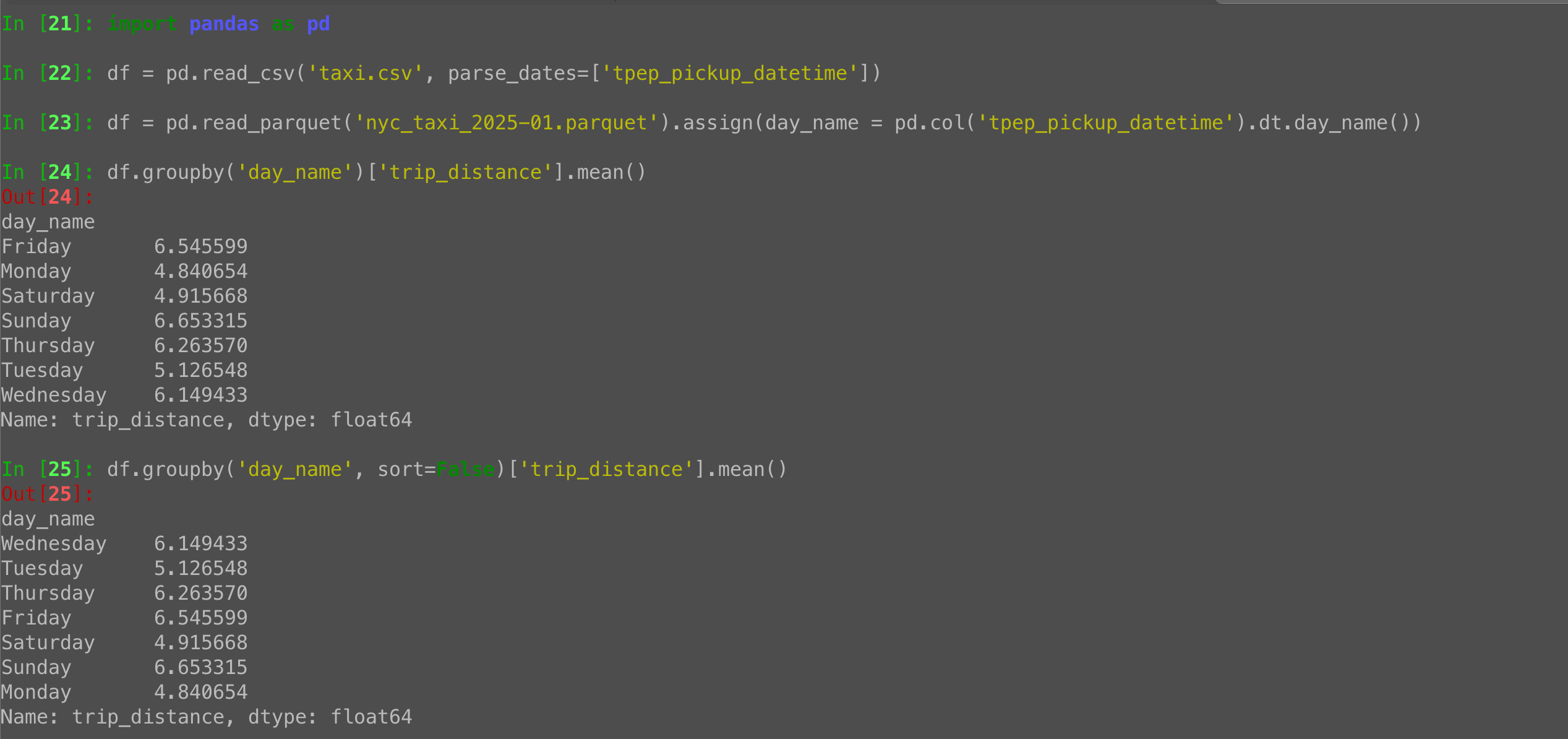
A “groupby” call in Python Pandas is normally sorted by index.
But if you’re grouping by month name, April will come before January.
Pass “sort=False”, and the index will reflect the order of appearance:
df.groupby('passenger_count', sort=False)['trip_distance'].mean()The post Pandas groupby with sort=False: Keep groups in order of appearance appeared first on LernerPython.
Armin Ronacher
What is Codemode
More than a year ago I wrote a few posts here that recommended people not to load custom tools into their context (or MCP servers) but to just use more scripts. Most importantly I wrote that Code Is All You Need and I wrote about that MCP needs code. With Pi 1.0 we now added MCP support via Codemode which in some ways is a long time coming, but then also maybe somewhat surprising to some. So I want to share some updated thoughts on this blog on what this all means.
What Are Tools
When a harness like Pi provides tools for an LLM to call, it does so by supplying some tool definitions which then translate into some token structure on the server side. Whether a model is encouraged to call a tool is the result of the reinforcement learning process. Something I wrote about before if you want to learn more.
One of the reasons we strongly lean towards CLI and bash is because it allows
easy composition of calls, and because the model also learns how the file system
works when it’s trained. So when it invokes a tool like echo foo > /tmp/test.txt the model also learns that after that tool call, there is now a
file called test.txt in /tmp.
However bash has one fundamental limitation which is that it can only compose programs that run. And there are some things, which are not programs, but native tools to the LLM and they sort of have to be.
The most obvious example here is read or view_image. If a multimodal model
needs to read an image, it cannot use cat for that because the harness needs
to inject the actual image payload into the protocol of the LLM.
Another quite vivid example are sub agents. In order to spawn and orchestrate sub agents, it’s tricky to avoid tools that are provided by the harness. While in theory the agent could provide a CLI tool that talks to the outer harness via environment variables and Unix sockets, it’s a rather crude process. It however has another issue, and that is where the code runs.
Brains vs Hands
To better understand that, it’s important to think a bit more about where all the bits and pieces run. There really usually are two different systems involved. The first is the brain, the harness: it runs on one machine. It’s trusted. The second is often the same machine, but it’s really where the tools are executing: the hands. In Pi we now call this the execution environment, but you can think of it as the target of all the operations.
Crucially what is important for us, is that there is a dividing line between the harness brain and the target environment that runs bash and executes the tools.
And splitting this in half has some really important consequences. For a start it means that they are running on different file systems and they have different levels of trust. If you for instance use a sandboxing solution like Gondolin your bash stuff will be sandboxed just fine, but the harness itself will not be.
Orchestrating The Harness
Which brings us to what Codemode really does: it’s a way for the LLM to express and orchestrate complex operations on the harness side, but not the execution environment side. Codemode runs in the harness, in its own sandbox. In case of Pi it’s running in QuickJS within a WASM runtime with intentional limitations: no network, no file system, no timers, limited RAM. The only way is to call more tools. You could also imagine that Codemode could run Scheme or some other language as well.
If you are not familiar with Codemode, it’s basically just a way to issue tool calls from within some language, in our case JavaScript. That allows you to compose those calls without necessarily going through the LLM’s context. Credit for naming goes to our friends at Cloudflare who coined it.
For instance if you issue a bash call as a regular tool call in the LLM, then we only throw the trailing 2000 lines into the context and if the agent wants more, it needs to look at the overflow file itself. If however the agent issues that invocation via Codemode, then the Codemode side gets larger outputs sent structurally.
Most importantly, because Codemode is JavaScript the agent can express concurrent operations and basic workflows. A common way in which you see agents now use this, is to first probe at 5-10 items from some tool response to see what it looks like, and to then write a Codemode script that processes the next n items.
Codemode also allows you to throw state into the transcript! That means that one Codemode invocation can stash away data, that the next call in the session can load again. And remember: this is on the harness host, not the sandbox.
In case of Pi, Codemode also allows you to issue calls that naturally do not make any sense in Pi’s traditional interface. For instance if you want to generate images with an image model or you want to classify some text with a one shot classifier model, those Pi APIs are exposed via Codemode, but not via regular tools where they would just waste context.
What It Looks Like
So now that we talked a bunch about it, it’s probably worth being a bit more explicit about it. Let’s walk ourselves through some invocations of Codemode of recent Pi sessions of mine. Note that none of this code is human written. It’s from real sessions of Pi, just re-indented for your viewing pleasure. The agent starts using Codemode automatically either because it’s a task where the model already naturally picks up that tool, or because a user asked it to.
Note that Codemode is by default only enabled in Pi when MCP is enabled, but you
can turn it on with "defaultTools": ["+codemode"] in the settings. Just ask
Pi to enable it for you.
Generating Images
Let’s start simple with image generation. Image generation is a feature that Pi supports in the AI SDK core, but it’s not a tool that the agent can use. In the past the only way to use image models has been to write a bespoke extension or to have the agent run node itself and use the internal image APIs. However because we expose quite a few of the internal model APIs within Codemode, it means that the agent can use it:
const [painter] = await models.getAvailableOfType("image");
const result = await models.generateImages(painter, {
  input: [{ type: "text", text: "A cute little puppy sitting on a grassy " +
    "lawn, soft natural light, photorealistic" }],
});
if (result.stopReason !== "stop") return result.errorMessage;

for (const block of result.output) {
  if (block.type === "image") image(block);
  else text(block.text);
}
Note that the call to image() sends the image back as image content to the
LLM. On the harness side it feeds it directly into both the agent, as well as
onto disk as a temporary artifact in case the agent wants to be able to pass
that image back to bash.
Classifying Things
Similar things apply to classifier models such as Jev. They also do not fit well into the workflows of an agent through the typical tools. But rather than making a bespoke tool available, Codemode just allows the agent to reach into the AI SDK and invoke those directly. Here you can see how Jev is used to mass process GitHub issues for a quick sentiment analysis:
const jev = await models.getModelOfType("classifier", "typesafe", "jev-latest");
const r = await tools.bash({
  command: "gh issue list --state open --limit 100 " +
    "--json number,title,body,comments",
});
const issues = JSON.parse(r.output);

const results = await Promise.all(issues.map(async (issue) => {
  const res = await models.classify(jev, {
    state: {
      title: issue.title,
      body: (issue.body || "").slice(0, 4000),
      comments: issue.comments.slice(-5).map(c => c.body.slice(0, 800)),
    },
    questions: {
      sentiment: {
        type: "choice",
        instructions: "What is the overall sentiment of the author towards pi?",
        criteria: {
          positive: "Appreciative, happy, constructive praise",
          neutral: "Matter-of-fact report or request without emotion",
          negative: "Frustrated, annoyed, upset, or angry",
        },
      },
      frustration: {
        type: "score",
        instructions: "How frustrated is the reporter?",
        criteria: ["not at all", "mildly", "clearly frustrated", "very angry"],
      },
      kind: {
        type: "choice",
        instructions: "What kind of issue is this?",
        criteria: {
          bug: "Bug report or regression",
          feature: "Feature request or enhancement",
          question: "Question or support request",
          other: "Docs, discussion, meta, spam",
        },
      },
    },
  });
  if (res.stopReason !== "stop") {
    return { n: issue.number, title: issue.title, error: res.errorMessage };
  }
  return { n: issue.number, title: issue.title, ...res.answers };
}));

store("sentiment_results", results);
return results
  .filter(r => !r.error)
  .sort((a, b) => b.frustration.score - a.frustration.score)
  .slice(0, 12)
  .map(r => `#${r.n} ${r.frustration.score.toFixed(2)} [${r.kind.choice}] ${r.title}`);
Note how in that above example we also call store() which dumps the result of
that execution into the session transcript. A future invocation of Codemode can
thus read back that result if it wants to.
The Promise.all here is fine, because Pi limits the total number of concurrent
tool executions itself to four and maintains a queue for the rest.
A more adventurous example is to use Jev to drive a game engine for debugging purposes:
Codemode with Jev for Game DebuggingHere it knows about my tankctl command and it built itself quickly a minimal
harness around it to drive a game loop to assist a user with debugging a
problem. Note how it built a 30 step loop in which each step goes back to both
the game engine to get a text dump of what’s going on, and then to Jev to
determine what to do next:
const jev = await models.getModelOfType("classifier", "typesafe", "jev-latest");
const tank = async (cmd) =>
  (await tools.bash({ command: `tools/tankctl "${cmd}"` })).output;
await tank("start --map assets/maps/night_arena.map");

const questions = {
  action: {
    type: "choice",
    instructions: "You control the tank '@' in a top-down tank game. " +
      "Choose the best next action.",
    criteria: {
      attack: "an enemy has line of sight to you and you can fire at it",
      approach: "no enemy has line of sight; drive toward the nearest enemy",
      dodge: "an enemy shot is heading at you and will hit soon",
      powerup: "a powerup is close and no enemy threatens you",
    },
  },
};

function commandFor(choice, st) {
  const p = st.player;
  const enemy = st.enemies.filter(e => !e.dead)
    .sort((a, b) => (b.los - a.los) || (a.dist - b.dist))[0];
  if (choice === "attack" && enemy) {
    return `fire_at tank ${enemy.id}; frames 30 until clear,damage,kill`;
  }
  if (choice === "dodge") {
    // move perpendicular to the closest incoming shot
    const s = st.projectiles.filter(s => !s.yours)
      .sort((a, b) => a.eta - b.eta)[0];
    const dir = s && Math.abs(s.vel[0]) > Math.abs(s.vel[1])
      ? (p.pos[1] > s.pos[1] ? "+down" : "+up")
      : (p.pos[0] > (s ? s.pos[0] : 0) ? "+right" : "+left");
    return `input ${dir}; frames 20 until damage; input stop`;
  }
  const powerup = st.powerups.filter(u => u.available)
    .sort((a, b) => a.dist - b.dist)[0];
  if (choice === "powerup" && powerup) {
    return `goto ${powerup.pos[0]} ${powerup.pos[1]} 180`;
  }
  return enemy ? `goto ${enemy.pos[0]} ${enemy.pos[1]} 90` : null;
}

const log = [];
for (let step = 0; step < 30; step++) {
  const st = JSON.parse(await tank("state"));
  if (st.state !== "playing") break;
  const threats = st.projectiles
    .filter(s => !s.yours && s.miss_dist < 1.5 && s.eta < 1.5)
    .map(s => `incoming shot dist ${s.dist} eta ${s.eta}s`)
    .join("\n") || "no incoming shots";
  const r = await models.classify(jev, {
    state: { map: await tank("view 8"), threats, hp: st.player.hp },
    questions,
  });
  if (r.stopReason !== "stop") {
    log.push(`#${step} classifier error: ${r.errorMessage}`);
    break;
  }
  const choice = r.answers.action.choice;
  const cmd = commandFor(choice, st);
  if (!cmd) break;
  log.push(`#${step} hp=${st.player.hp} ${choice} -> ${await tank(cmd)}`);
}
return log.join("\n");
Calling MCP Servers
Lastly, Codemode obviously is great for calling MCP servers. And because we do not actually expose any of the MCP tools to the LLM, the agent first uses provided APIs to issue a tool search within Codemode to discover what it might be able to do with the connected servers. This form of progressive discovery makes the whole MCP business work well enough for a lot of use cases today.
Here for instance you can see the agent reach for the Sentry MCP straight away, even without discovering the tools, presumably because it has learned during the RL process already about what the Sentry MCP looks like. But it learns from what we inject into the system prompt, that the Sentry server is available to begin with. It’s not completely guessing here.
const orgs = await tools.mcp__sentry__find_organizations({});
const { organizations } = orgs.structuredContent;
const results = await Promise.allSettled(organizations.map(org =>
  tools.mcp__sentry__find_projects({
    organizationSlug: org.slug,
    regionUrl: org.regionUrl,
  })
));
return organizations.map((org, i) => {
  const r = results[i];
  if (r.status !== "fulfilled") return { org: org.slug, error: String(r.reason) };
  if (r.value.isError) return { org: org.slug, error: r.value.content };
  return {
    org: org.slug,
    projects: r.value.structuredContent.projects.map(p => p.slug),
  };
});
Modern MCP Is A Fight
I really don’t want to talk too much about MCP here, but MCP is in fact a protocol that greatly benefits from Codemode. The problem in parts is that MCP in practice often targets harnesses that do not (yet?) use Codemode. But the tide is shifting. In the meantime, a temporary crutch has been to do what Cloudflare did, and do Codemode within the MCP server. But now we have Codemode in Codemode which is pretty bad. It means double JSON escaping, easy for smaller models to get confused by and the inner code cannot call the outer tools. So if you for instance use the Cloudflare MCP servers in Pi, the agent needs to write JavaScript and funnel it through more JavaScript. This is really not optimal, but it’s also understandable that this is happening:
const accRes = await tools.mcp__cloudflare__execute({
  code: `async () => {
    const r = await cloudflare.request({ method: "GET", path: "/accounts" });
    return r.result.map(a => ({ id: a.id, name: a.name }));
  }`,
});
const accounts = JSON.parse(accRes.content.map(c => c.text).join(""));

const out = [];
for (const account of accounts) {
  const r = await tools.mcp__cloudflare__execute({
    account_id: account.id,
    code: `async () => {
      const r = await cloudflare.request({
        method: "GET",
        path: \`/accounts/\${accountId}/workers/scripts\`,
      });
      return r.result.map(s => ({ id: s.id, modified: s.modified_on }));
    }`,
  });
  out.push({ account: account.name, workers: r.content.map(c => c.text).join("") });
}
return out;
MCP Desires
So to end things off: how well does Codemode work with MCP today? Well … not amazingly well. That’s because MCP servers are not really targeting harnesses that use Codemode yet (though at this point I think most harnesses support it).
For this to work well some recommendations:
- Structured content: Codemode wants calls to return some nicely
formatted JSON. So that needs to come back from the server, and many don’t
do that yet. The
outputSchemasystem in MCP is great for that. - Consistent results: an interesting failure case is when an MCP server does not return consistent data. For instance because it tries to token optimize things depending on how many items are in the result set. This can cause an initial probe with 5 items to succeed, but then fail when the server returns the maximum batch size.
- Large binary data: today MCP does not yet support large binary data so quite a few use cases that are really interesting do not work well at all yet. You end up with all kinds of weird workarounds such as pre-signed URLs to allow file uploads then to happen through non MCP channels.
- Composable tool search: the MCP server might know better than the MCP client which tool is appropriate for a task. But there is no good mechanism today that allows a harness to fan out tool searches across multiple MCP servers. It’s all emergent behavior and it does not scale well to multiple active servers.
Future of Codemode
So where does this leave us? Is this a reversal of what I wrote a year ago where I encouraged CLIs? I don’t think so. In fact, the MCP ecosystem from my perspective picked up on exactly what we pointed out a year ago works: code. But Codemode goes beyond MCP in that it can act as a capable mechanism within the harness to express more freedom for the agent.
There are however also some things that we still need to figure out. For one, durability with Codemode is trickier. We might have to adopt some ideas from durable workflow engines here to snapshot invocations. Or maybe, something like Starlark is a better composition language than JavaScript given its deterministic nature.
Images, binary data and just the inability of this pattern to work with smaller models is also something that needs to be fleshed out. So it’s for sure not a perfect solution yet, but it’s quite a useful pattern that I expect us to leverage more.
October 05, 2026
Tryton News
Security Release for issue 15032
Jaisurya has discovered that the content of the HTML editor was not escaped.
Impact
- Attack Vector: Network
- Attack Complexity: Low
- Privileges Required: Low
- User Interaction: Required
- Scope: Changed
- Confidentiality: Low
- Integrity: Low
- Availability: None
Workaround
Setup restrictive CSP without unsafe inline script may prevent the attack.
Resolution
All affected users should upgrade trytond to the latest version.
Affected versions per series:
trytond:- 8.0: <= 8.0.10
- 7.8: <= 7.8.16
- 7.0: <= 7.0.57
Not affected versions per series:
trytond:- 8.0: >= 8.0.11
- 7.8: >= 7.8.17
- 7.0: >= 7.0.58
Reference
Concerns?
Any security concerns should be reported on the bug-tracker at https://bugs.tryton.org/ with the confidential checkbox checked.
1 post - 1 participant
Security Release for issue 15035
lizparadox_ has discovered that the report name can be used to execute commands on the server.
Impact
- Attack Vector: Network
- Attack Complexity: Low
- Privileges Required: High
- User Interaction: Required
- Scope: Unchanged
- Confidentiality: High
- Integrity: High
- Availability: High
Workaround
There is no workaround.
Resolution
All affected users should upgrade trytond to the latest version.
Affected versions per series:
trytond:- 8.0: <= 8.0.10
- 7.8: <= 7.8.16
Not affected versions per series:
trytond:- 8.0: >= 8.0.11
- 7.8: >= 7.8.17
Reference
Concerns?
Any security concerns should be reported on the bug-tracker at https://bugs.tryton.org/ with the confidential checkbox checked.
1 post - 1 participant
LernerPython blog, from Reuven Lerner
Pandas groupby basics: Aggregating a numeric column by category
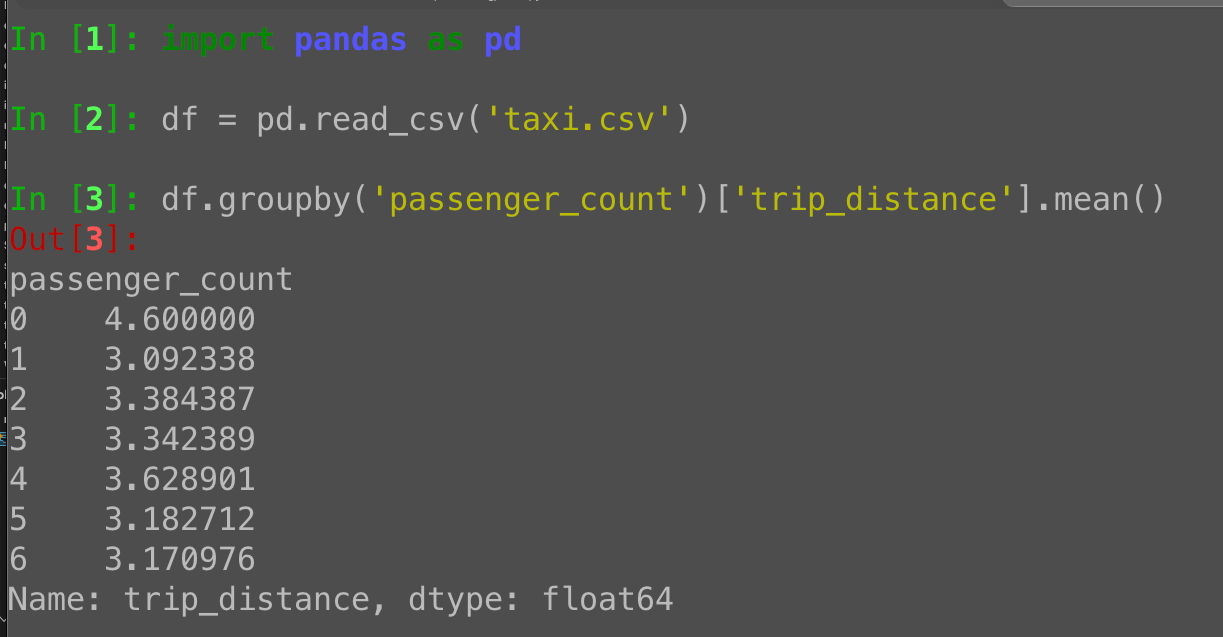
The simplest grouping in Python Pandas is groupby:
df.groupby(CATEGORICAL)[NUMERIC].AGG_METHOD()For example:
df.groupby('passenger_count')['trip_distance'].mean()Returns a series whose index is the unique values from passenger_count.
The post Pandas groupby basics: Aggregating a numeric column by category appeared first on LernerPython.
October 04, 2026
Mark Dufour
Shed Skin v0.9.14, v1.0 coming soon!
I have just released version 0.9.14 of Shed Skin, a restricted-python to C++ transpiler. Shed Skin allows one to effectively convert (or transpile) pure Python code to highly optimized machine code. This comes at the cost though of having to conform to a seriously restricted subset of Python features/libraries. Although, it is possible to generate extension modules, that can be used in larger, unrestricted, programs.
While the previous release was just a month ago, I felt like there were so many important improvements already that I didn't want them to wait for the 1.0 release which looks like it may finally happen within a few months! From a completely rewritten and faster, more scalable, type inference engine, to full Unicode support, to almost complete feature parity with Python 3.15 (for the supported modules), to support for heterogeneous 3-len tuples - it has been a hectic month :)
With all this in place, I'm starting to plan the final pieces I would like to see in place for a 1.0 release. There is still quite a bit of work left, but much of it is mechanical and just working through a long list of minor decisions and details.. It should be possible to have all that done around the end of the year.
I'm also happy to mention a relatively new but similar project here, TurboPython, which may be of interest to those reading this. The most interesting difference with Shed Skin is that it uses a RUST-like memory model: "TurboPython is a general-purpose, statically typed language that compiles Python through C++ to a native binary. It combines Python's syntax with an ownership model that gives memory safety and predictable performance—no garbage collector, no automatic reference counting, no GIL."
October 03, 2026
Brian Okken
PyBay 2026 Talk info and slides
Talk Title: Is TDD even relevant anymore? Yes, but don’t be dumb about it.
Event: PyBay 2026
Slides: tdd-pybay-2026.pdf
October 02, 2026
Python Software Foundation
Announcing the 2026 PSF Board Election Results!
The 2026 election for the PSF Board created an opportunity for conversations about the PSF's work to serve the global Python community. We appreciate community members' perspectives, passion, and engagement in the election process this year.
We want to send a big thanks to everyone who ran and was willing to serve on the PSF Board. Even if you were not elected, we appreciate all the time and effort you put into thinking about how to improve the PSF and represent the parts of the community you participate in. We hope that you will continue to think about these issues, share your ideas, and join a PSF Work Group or PSF initiative if you feel called to do so.
Board Members Elect
.png)
- Elaine Wong
- Ee Durbin
- Laís Carvalho
- Georgi Ker
We’ll be in touch with all the elected candidates shortly to schedule onboarding. Newly elected PSF Board members are provided orientation for their service and will be joining the upcoming board meeting in October.
Thank you!
We’d like to take this opportunity to thank our outgoing board members. Cheuk Ting Ho has been a super engaged PSF Board member, participating in many committees, and helping out on many PSF Programs and projects during her time on the PSF Board. Chris Neugebauer has been a longtime board member and in particular has been the watch guard of our bylaws conversations and has always been ready to share institutional knowledge. Denny Perez has been instrumental on the PSF Board, serving on the Executive Committee, as Treasurer, and on various committees during her tenure. All three of you helped shape the PSF’s Strategic Plan for the next 5 years, which was a massive undertaking. Thank you, Cheuk, Chris, and Denny for your leadership and dedication to the PSF and the Python community. You will be missed and are deeply appreciated!
Our heartfelt thanks go out to each of you who took the time to review the candidates and submit your votes. Your participation helps the PSF represent our community. We received 670 total ballots, easily reaching quorum–1/3 of affirmed voting members (1123). We’re especially grateful for your patience with continuing to navigate the additions to the elections processes with the inaugural Python Packaging Council election.
We also want to thank everyone who helped promote this year’s board election, especially Board Member KwonHan Bae, who took the initiative to cover this year’s election and worked with PSF Staff to conduct written interviews with candidates. This promotional effort was inspired by the work of Python Community News in 2023. We also want to highlight the PSF staff members and PSF Board members who put in tons of effort each year as we work to continually improve the PSF elections.
What’s next?
If you’re interested in the complete tally, make sure to check the Python Software Foundation Board of Directors Election 2026 Results page. These results will be available until November 10, 2026.
The PSF Election team will conduct a retrospective of this year’s election process to ensure we are improving year over year. We received valuable feedback about the process and tooling. We hope to be able to implement more changes for next year to ensure a smooth and accessible election process for everyone in our community. If you have feedback or comments about this year’s PSF Board election, we welcome you to join the discussion on discuss.python.org or email psf-elections@pyfound.org.
Finally, it might feel a little early to mention this, but we will have at least 3 seats open again next year. If you're interested in running or learning more, we encourage you to contact a current PSF Board member or two this year and ask them about their experience serving on the board.
Talk Python to Me
#565: Tachyon, Python 3.15's Built-in Sampling Profiler
Do you know what's actually slow in your Python app? Or are you guessing? Until now, profiling Python meant a tracing profiler that made your code 2 to 3 times slower. Or a third-party tool that broke with every new release. Python 3.15 fixes that. It ships Tachyon, a sampling profiler built into the standard library. It attaches to live production apps with almost zero overhead. My guests are Pablo Galindo Salgado, CPython core developer and Steering Council member, and László Kiss Kollár from Bloomberg's Python infrastructure team. Their first prototype ran at two samples a second. Now it does over a million hz. And it lands in Python 3.15 this October.<br/> <br/> <strong>Episode sponsors</strong><br/> <br/> <a href='https://talkpython.fm/sentry'>Sentry Error Monitoring, Code talkpython26</a><br> <a href='https://talkpython.fm/devopsbook'>Python in Production</a><br> <a href='https://talkpython.fm/training'>Talk Python Courses</a><br/> <br/> <h2 class="links-heading mb-4">Links from the show</h2> <div><strong>Guests</strong><br/> <strong>László Kiss Kollár</strong>: <a href="https://www.linkedin.com/in/lkollar/?featured_on=talkpython" target="_blank" >linkedin.com</a><br/> <strong>Pablo Galindo Salgado</strong><br/> <br/> <strong>3.11</strong>: <a href="https://talkpython.fm/episodes/show/388/python-3.11-is-here-and-its-fast" target="_blank" >talkpython.fm</a><br/> <strong>Memray</strong>: <a href="https://talkpython.fm/episodes/show/425/memray-the-endgame-python-memory-profiler" target="_blank" >talkpython.fm</a><br/> <strong>PyStack</strong>: <a href="https://talkpython.fm/episodes/show/419/debugging-python-in-production-with-pystack" target="_blank" >talkpython.fm</a><br/> <strong>profile and cProfile</strong>: <a href="https://docs.python.org/3/library/profile.html?featured_on=talkpython" target="_blank" >docs.python.org</a><br/> <strong>py-spy</strong>: <a href="https://github.com/benfred/py-spy?featured_on=talkpython" target="_blank" >github.com</a><br/> <strong>Austin</strong>: <a href="https://github.com/P403n1x87/austin?featured_on=talkpython" target="_blank" >github.com</a><br/> <strong>PEP 799</strong>: <a href="https://peps.python.org/pep-0799/?featured_on=talkpython" target="_blank" >peps.python.org</a><br/> <strong>PEP 768</strong>: <a href="https://peps.python.org/pep-0768/?featured_on=talkpython" target="_blank" >peps.python.org</a><br/> <strong>PyCon US 2026 talk</strong>: <a href="https://us.pycon.org/2026/schedule/presentation/31?featured_on=talkpython" target="_blank" >us.pycon.org</a><br/> <strong>The docs</strong>: <a href="https://docs.python.org/3.15/library/profiling.sampling.html?featured_on=talkpython" target="_blank" >docs.python.org</a><br/> <strong>Backport to 3.14</strong>: <a href="https://github.com/pythonbackport/python-profiling?featured_on=talkpython" target="_blank" >github.com</a><br/> <br/> <strong>Watch this episode on YouTube</strong>: <a href="https://www.youtube.com/watch?v=yZdfOf8kQo4" target="_blank" >youtube.com</a><br/> <strong>Episode #565 deep-dive</strong>: <a href="https://talkpython.fm/episodes/show/565/tachyon-python-3.15s-built-in-sampling-profiler#takeaways-anchor" target="_blank" >talkpython.fm/565</a><br/> <strong>Episode transcripts</strong>: <a href="https://talkpython.fm/episodes/transcript/565/tachyon-python-3.15s-built-in-sampling-profiler" target="_blank" >talkpython.fm</a><br/> <br/> <strong>Theme Song: Developer Rap</strong><br/> <strong>🥁 Served in a Flask 🎸</strong>: <a href="https://talkpython.fm/flasksong" target="_blank" >talkpython.fm/flasksong</a><br/> <br/> <strong>---== Don't be a stranger ==---</strong><br/> <strong>YouTube</strong>: <a href="https://talkpython.fm/youtube" target="_blank" ><i class="fa-brands fa-youtube"></i> youtube.com/@talkpython</a><br/> <br/> <strong>Bluesky</strong>: <a href="https://bsky.app/profile/talkpython.fm" target="_blank" >@talkpython.fm</a><br/> <strong>Mastodon</strong>: <a href="https://fosstodon.org/web/@talkpython" target="_blank" ><i class="fa-brands fa-mastodon"></i> @talkpython@fosstodon.org</a><br/> <strong>X.com</strong>: <a href="https://x.com/talkpython" target="_blank" ><i class="fa-brands fa-twitter"></i> @talkpython</a><br/> <br/> <strong>Michael on Bluesky</strong>: <a href="https://bsky.app/profile/mkennedy.codes?featured_on=talkpython" target="_blank" >@mkennedy.codes</a><br/> <strong>Michael on Mastodon</strong>: <a href="https://fosstodon.org/web/@mkennedy" target="_blank" ><i class="fa-brands fa-mastodon"></i> @mkennedy@fosstodon.org</a><br/> <strong>Michael on X.com</strong>: <a href="https://x.com/mkennedy?featured_on=talkpython" target="_blank" ><i class="fa-brands fa-twitter"></i> @mkennedy</a><br/></div>
Python Insider
Python 3.15.0 candidate 3 is here!
Following tradition, a surprise rc3!